Claudeのビジョン機能を使用すると、メッセージに画像を含め、Claudeにさまざまな方法でそれを分析するよう依頼できます。画像に写っているものを説明させたり、複数の画像を比較させたり、オブジェクトの数を数えさせたり、複雑な視覚分析タスクを実行させたりすることができます。
画像処理の基本
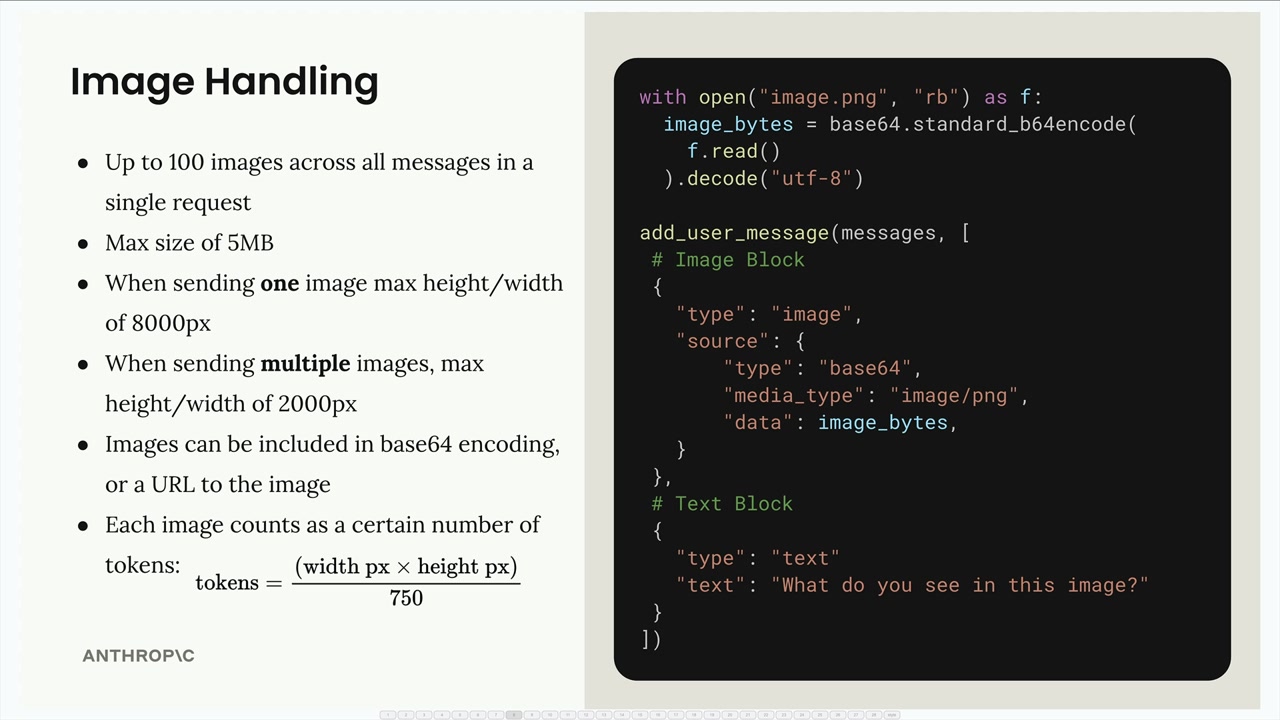
画像を扱う際に留意すべき重要な制限がいくつかあります。
- 1リクエスト内のすべてのメッセージを通じて最大600枚の画像(200kトークンのコンテキストウィンドウを持つモデルの場合は100枚)
- 画像1枚あたりの最大サイズは10MB(base64エンコード後の測定)
- 1枚の画像を送信する場合:最大高さ/幅は8000px
- 複数の画像を送信する場合:最大高さ/幅は2000px
- 画像はbase64エンコードまたは画像へのURLとして含めることができます
- 各画像は、その寸法に基づいてトークンとしてカウントされます:
tokens = ⌈width / 28⌉ × ⌈height / 28⌉
Claudeに画像を送信するには、ユーザーメッセージにテキストブロックと並べて画像ブロックを含めます。構造は次のとおりです。
import base64

with open("image.png", "rb") as f:
    image_bytes = base64.standard_b64encode(f.read()).decode("utf-8")

add_user_message(messages, [
    # 画像ブロック
    {
        "type": "image",
        "source": {
            "type": "base64",
            "media_type": "image/png",
            "data": image_bytes,
        }
    },
    # テキストブロック
    {
        "type": "text",
        "text": "What do you see in this image?"
    }
])
メッセージフロー
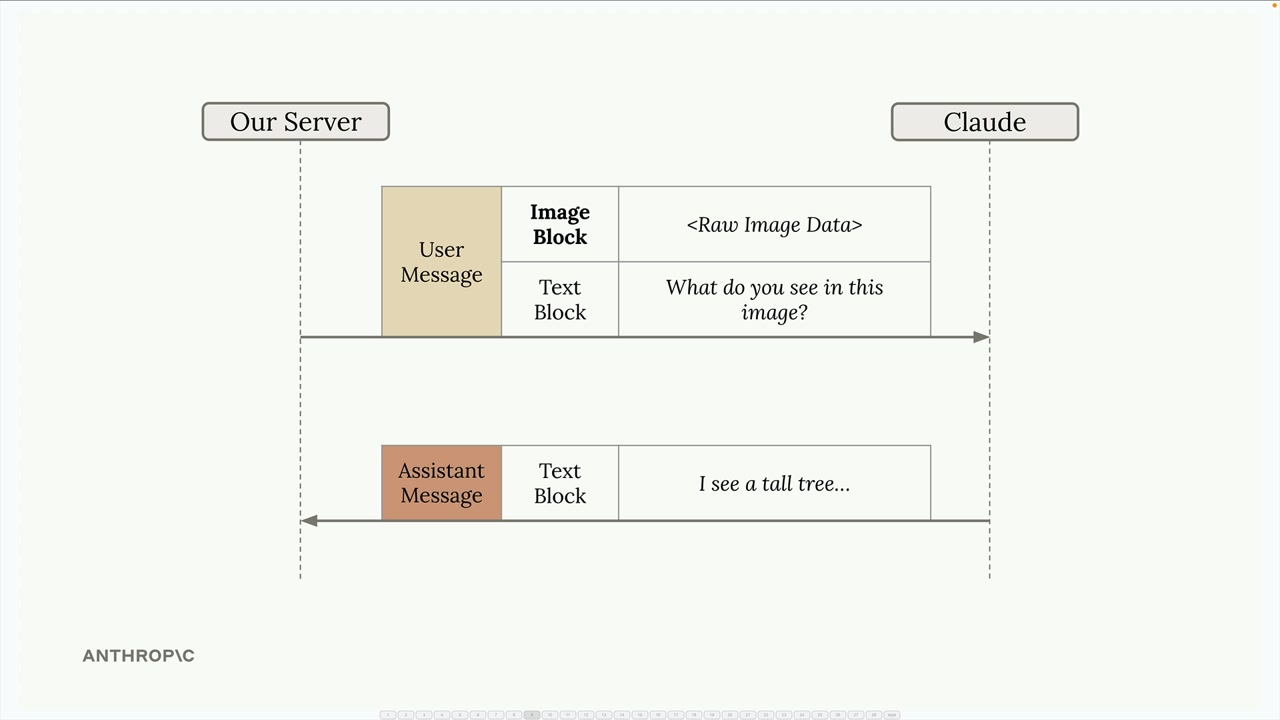
この会話は、テキストのみのやり取りとまったく同じように機能します。サーバーは画像ブロックとテキストブロックの両方を含むユーザーメッセージをClaudeに送信し、Claudeはその分析内容を含むテキストブロックで応答します。
プロンプティングのテクニック
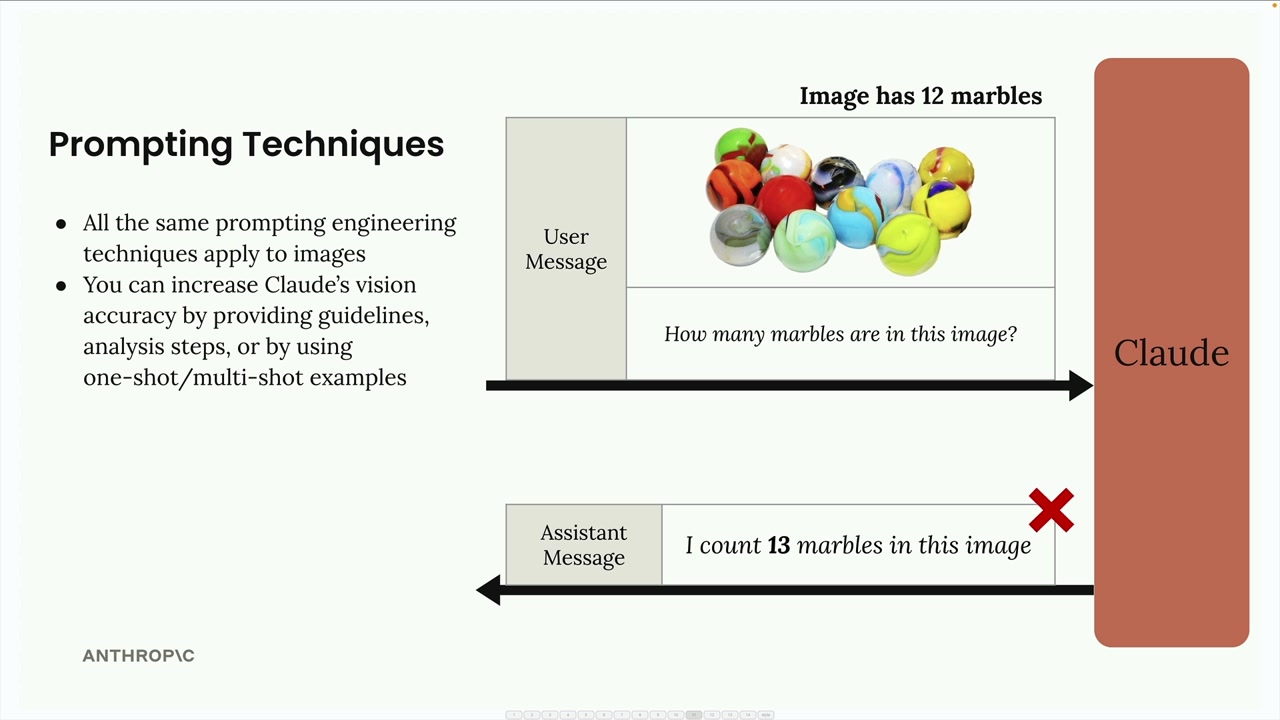
画像で良い結果を得るための鍵は、テキストで使用するのと同じプロンプトエンジニアリングのテクニックを適用することです。単純なプロンプトでは結果が悪くなることがよくあります。例えば、「この画像には何個のビー玉がありますか?」と尋ねると、誤った個数が返ってくるかもしれません。
次の方法により、Claudeの精度を劇的に向上させることができます。
- 詳細なガイドラインと分析手順を提供する
- ワンショットまたはマルチショットの例を使用する
- 複雑なタスクをより小さなステップに分解する
ステップバイステップの分析
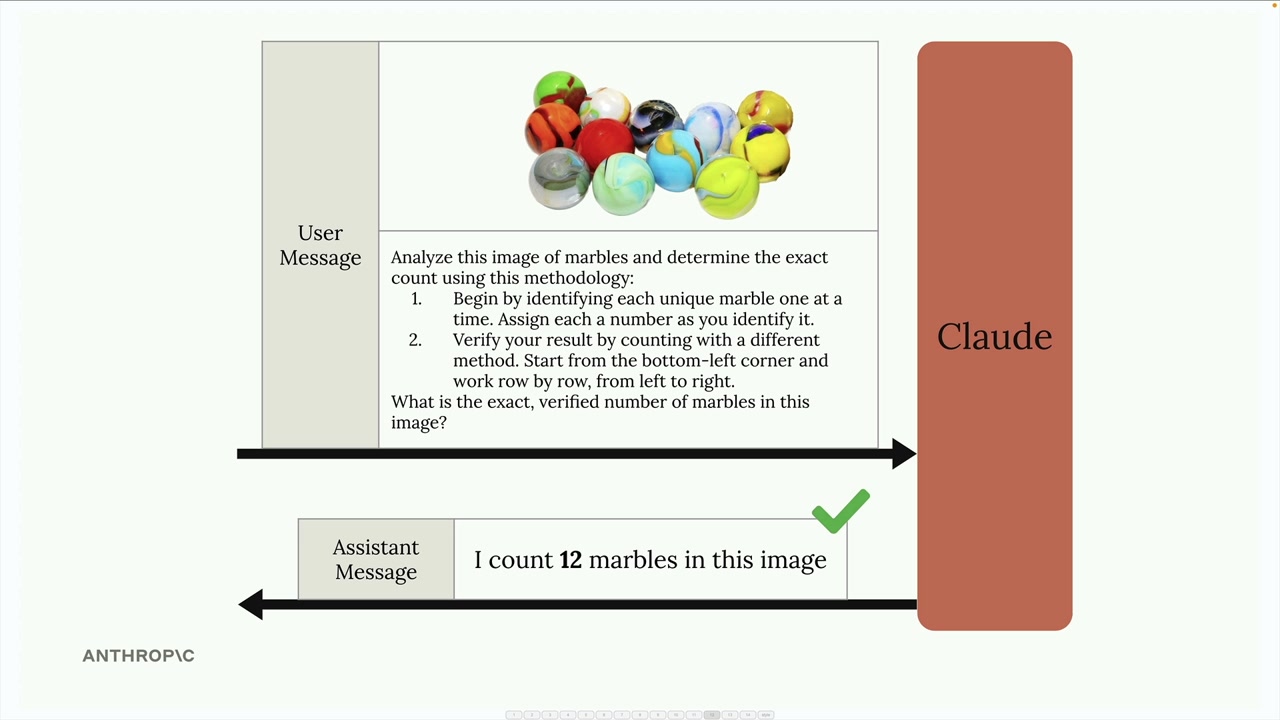
単純な質問をする代わりに、Claudeに手法を提供します。
Analyze this image of marbles and determine the exact count using this methodology:
1. Begin by identifying each unique marble one at a time. Assign each a number as you identify it.
2. Verify your result by counting with a different method. Start from the bottom-left corner and work row by row, from left to right.

What is the exact, verified number of marbles in this image?ワンショットの例
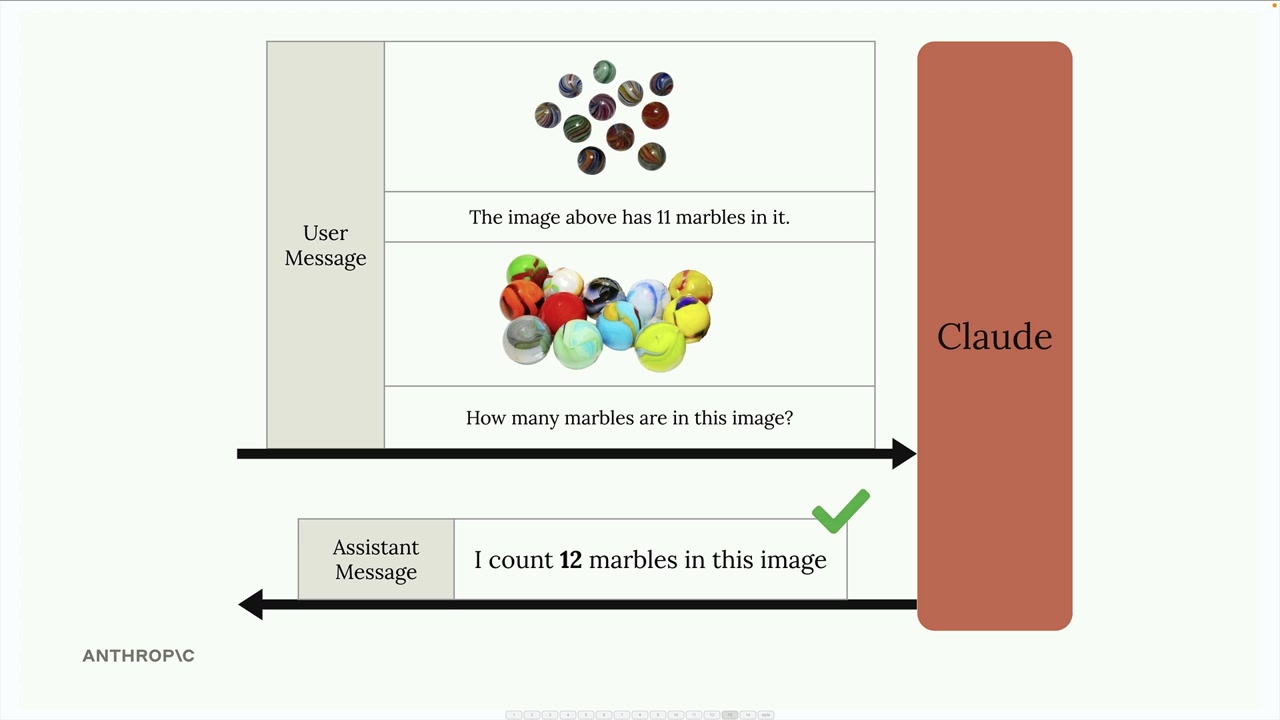
メッセージ内に例を提供することでも精度を向上させることができます。既知の個数が分かっている画像を含め、正しい答えを述べた上で、対象の画像について尋ねます。これにより、Claudeに求める分析の種類についての参照ポイントが与えられます。
実例:火災リスク評価
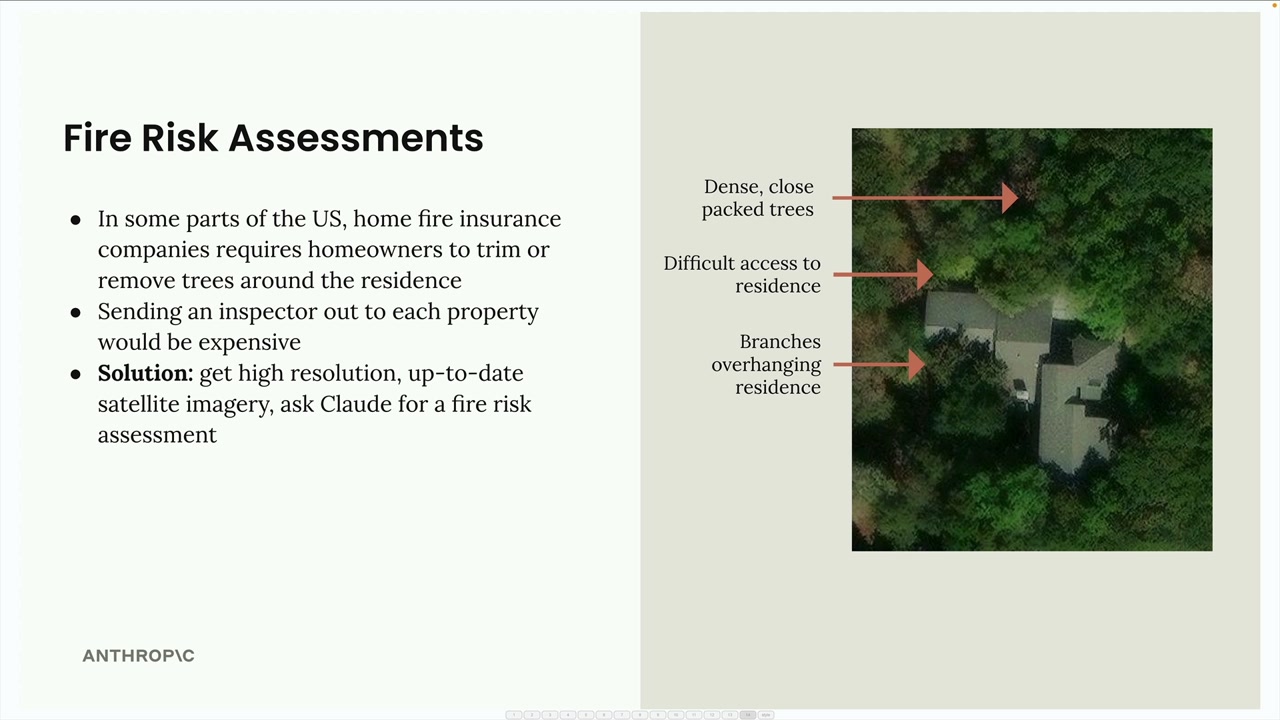
ここで実用的な応用例を紹介します:住宅保険における火災リスク評価の自動化です。すべての物件に検査員を派遣する代わりに、保険会社は衛星画像とClaudeの分析を利用できます。
このシステムは衛星画像を分析し、以下を特定します。
- 住宅近くの密集した樹木
- 緊急サービスにとってのアクセス困難なルート
- 住宅にかぶさる枝
「火災リスクスコアを出してください」といった単純なプロンプトではなく、適切に構成されたプロンプトは分析を具体的なステップに分解します。
Analyze the attached satellite image of a property with these specific steps:

1. Residence identification: Locate the primary residence on the property by looking for:
   - The largest roofed structure
   - Typical residential features (driveway connection, regular geometry)
   - Distinction from other structures (garages, sheds, pools)

2. Tree overhang analysis: Examine all trees near the primary residence:
   - Identify any trees whose canopy extends directly over any portion of the roof
   - Estimate the percentage of roof covered by overhanging branches (0-25%, 25-50%, 50-75%, 75%+)
   - Note particularly dense areas of overhang

3. Fire risk assessment: For any overhanging trees, evaluate:
   - Potential wildfire vulnerability (ember catch points, continuous fuel paths to structure)
   - Proximity to chimneys, vents, or other roof openings if visible
   - Areas where branches create a "bridge" between wildland vegetation and the structure

4. Defensible space identification: Assess the property's overall vegetative structure:
   - Identify if trees connect to form a continuous canopy over or near the home
   - Note any obvious fuel ladders (vegetation that can carry fire from ground to tree to roof)

5. Fire risk rating: Based on your analysis, assign a Fire Risk Rating from 1-4:
   - Rating 1 (Low Risk): No tree branches overhanging the roof, good defensible space around the home
   - Rating 2 (Moderate Risk): Minimal overhang (<25% of roof), some separation between tree canopies
   - Rating 3 (High Risk): Significant overhang (25-50% of roof), connected tree canopies, multiple vulnerability points
   - Rating 4 (Severe Risk): Extensive overhang (>50% of roof), dense vegetation against structure

For each item above (1-5), write one sentence summarizing your findings, with your final response being the numerical rating.この詳細なプロンプトは、Claudeを体系的な分析へと導き、単純な依頼よりもはるかに正確で有用な評価結果をもたらします。
覚えておいてください:テキストに有効なプロンプティングのテクニックは、画像にも同様に適用されます。信頼できる結果を求めるなら、単純な質問に頼るのではなく、詳細で構造化されたプロンプトを作成することに時間を投じてください。