加载中
Claude的视觉能力让您可以在消息中包含图像,并要求Claude以多种方式对其进行分析。您可以要求Claude描述图像中的内容、比较多张图像、计数物体,或执行复杂的视觉分析任务。
图像处理基础
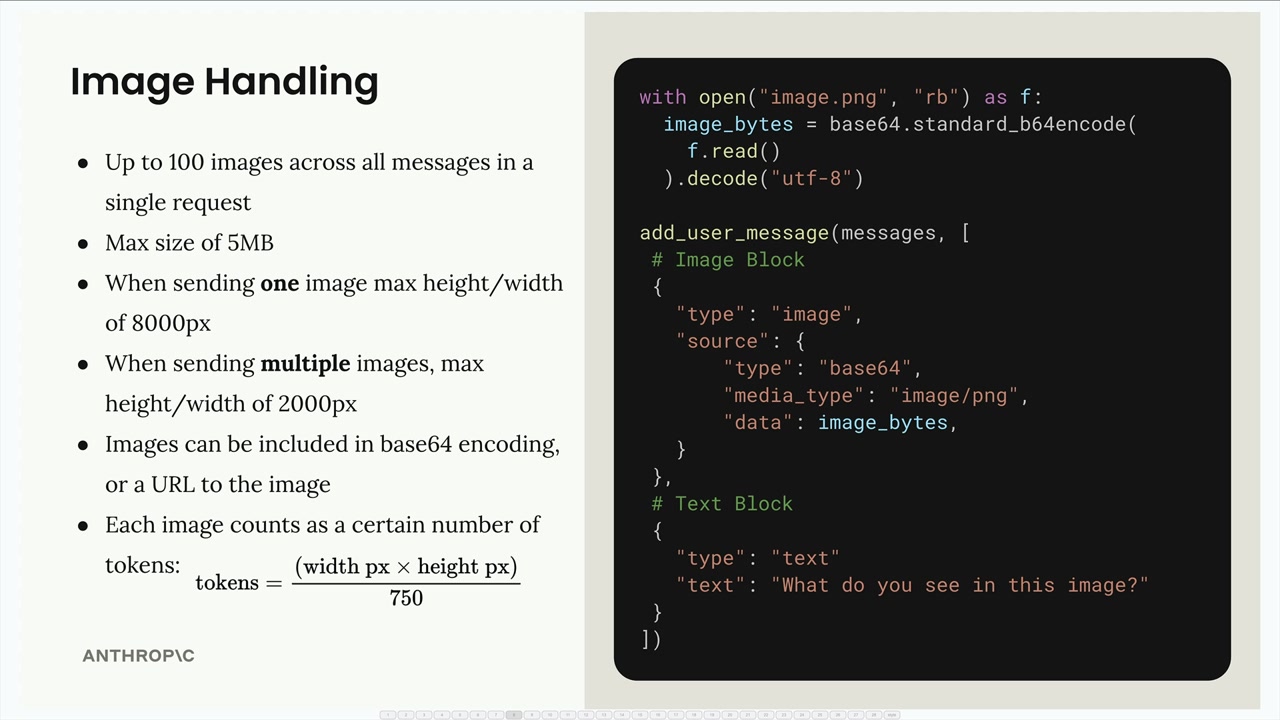
在处理图像时,有几个重要的限制需要牢记:
- 单个请求中所有消息累计最多可包含600张图像(对于上下文窗口为200k令牌的模型则为100张)
- 每张图像最大为10MB(以base64编码后计算)
- 发送单张图像时:最大高度/宽度为8000px
- 发送多张图像时:最大高度/宽度为2000px
- 图像可以以base64编码或图像URL的形式包含
- 每张图像根据其尺寸计为令牌:
tokens = ⌈width / 28⌉ × ⌈height / 28⌉
要向Claude发送图像,您需要在用户消息中包含图像块以及文本块。以下是其结构:
python
import base64

with open("image.png", "rb") as f:
    image_bytes = base64.standard_b64encode(f.read()).decode("utf-8")

add_user_message(messages, [
    # 图像块
    {
        "type": "image",
        "source": {
            "type": "base64",
            "media_type": "image/png",
            "data": image_bytes,
        }
    },
    # 文本块
    {
        "type": "text",
        "text": "What do you see in this image?"
    }
])
消息流程
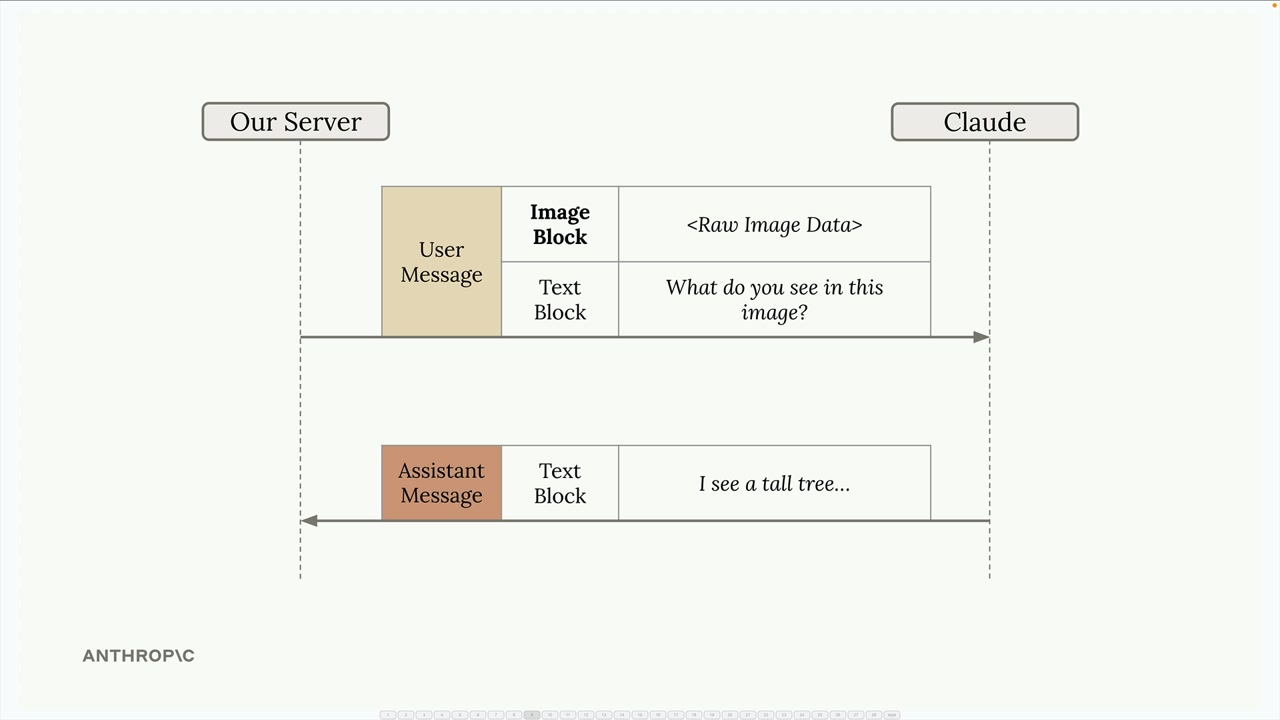
对话的工作方式与纯文本交互完全相同。您的服务器向Claude发送一条同时包含图像块和文本块的用户消息,Claude则以包含其分析内容的文本块作出回应。
提示技巧
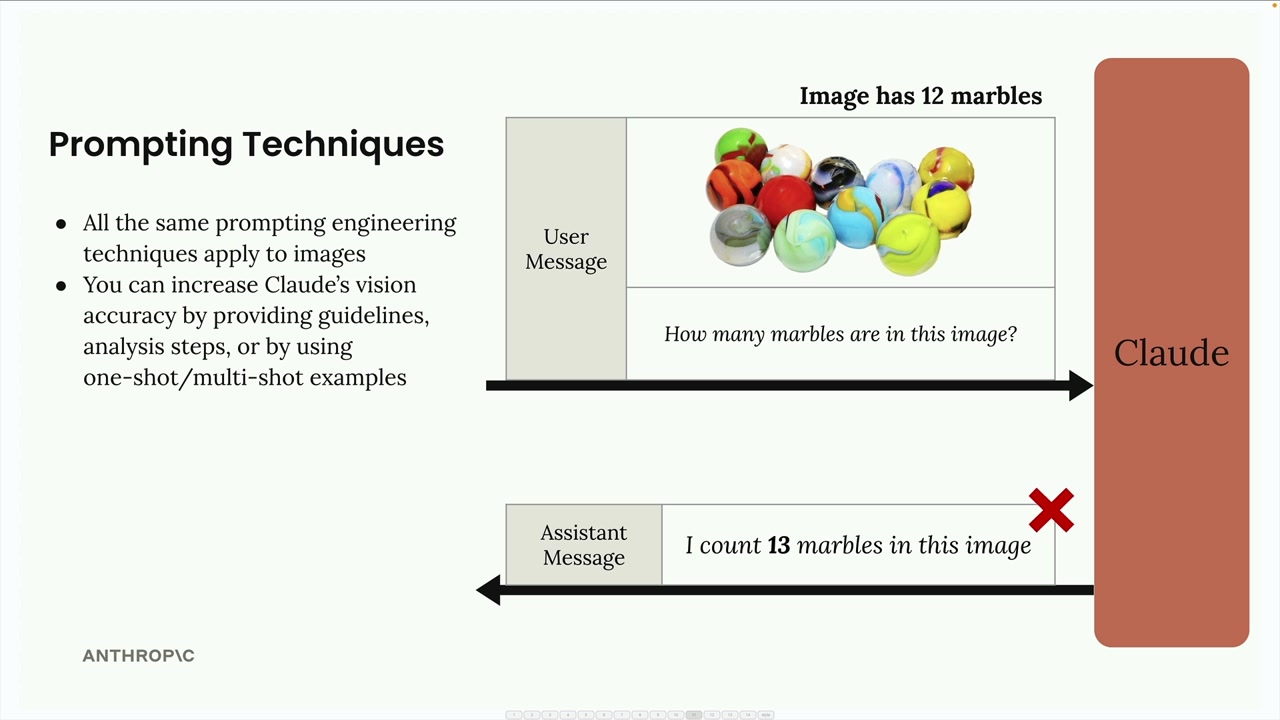
在使用图像时取得良好效果的关键在于应用与文本相同的提示工程技巧。简单的提示往往会导致不佳的结果。例如,询问"这张图片中有多少颗弹珠?"可能会得到错误的计数。
您可以通过以下方式大幅提高Claude的准确性:
- 提供详细的指南和分析步骤
- 使用单样本或多样本示例
- 将复杂任务拆分为较小的步骤
逐步分析
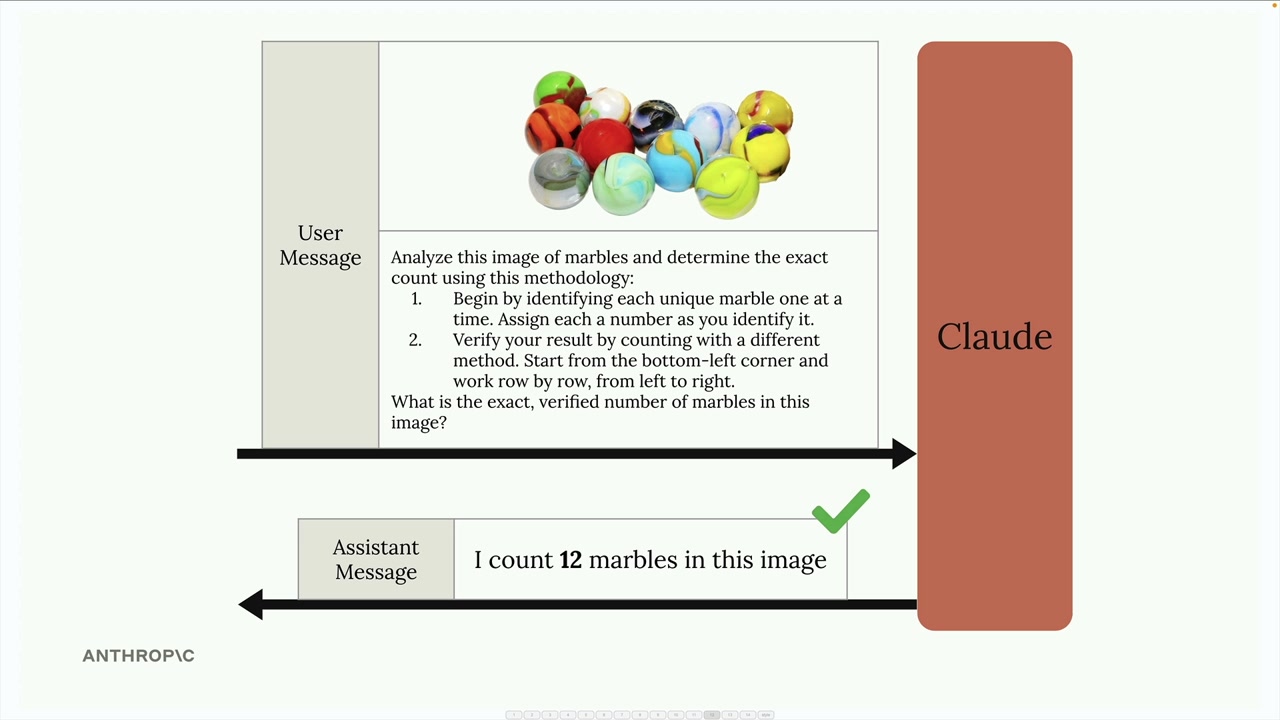
与其提出一个简单的问题,不如为Claude提供一套方法论:
Analyze this image of marbles and determine the exact count using this methodology:
1. Begin by identifying each unique marble one at a time. Assign each a number as you identify it.
2. Verify your result by counting with a different method. Start from the bottom-left corner and work row by row, from left to right.

What is the exact, verified number of marbles in this image?单样本示例
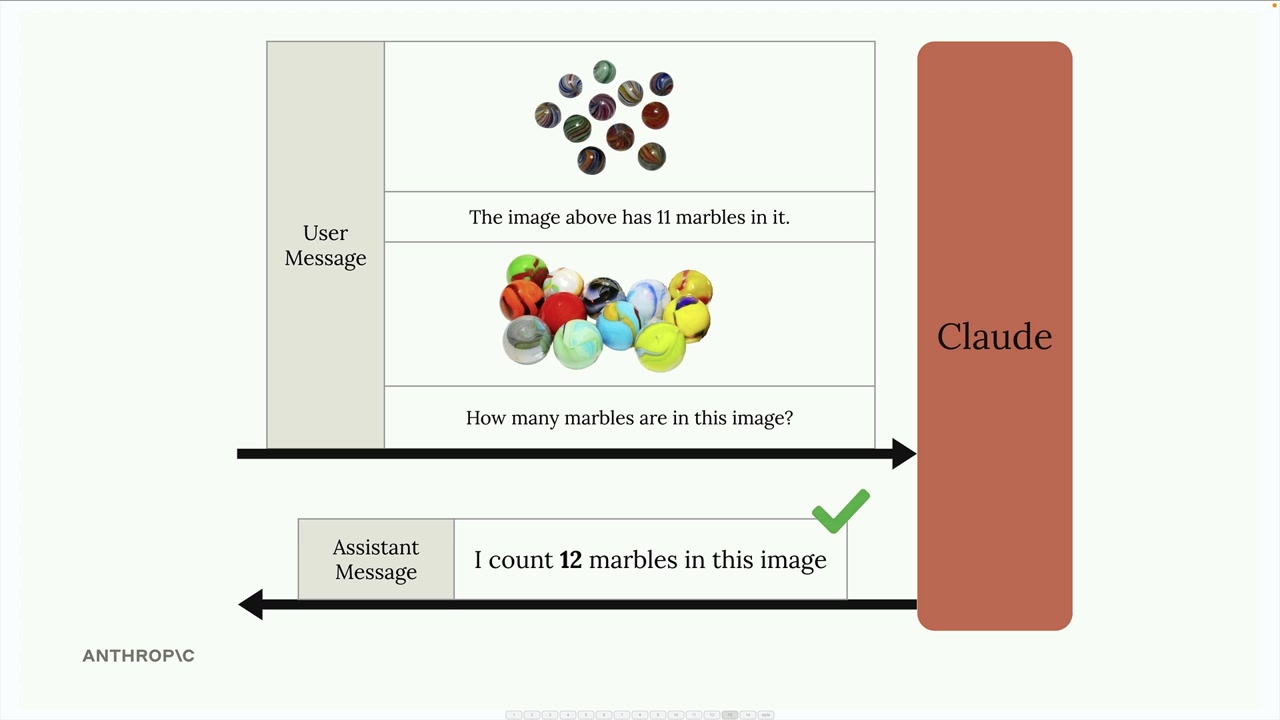
您还可以通过在消息中提供示例来提高准确性。先包含一张已知数量的图像,说明正确答案,然后再询问目标图像。这为Claude提供了您所需分析类型的参考点。
真实案例:火灾风险评估
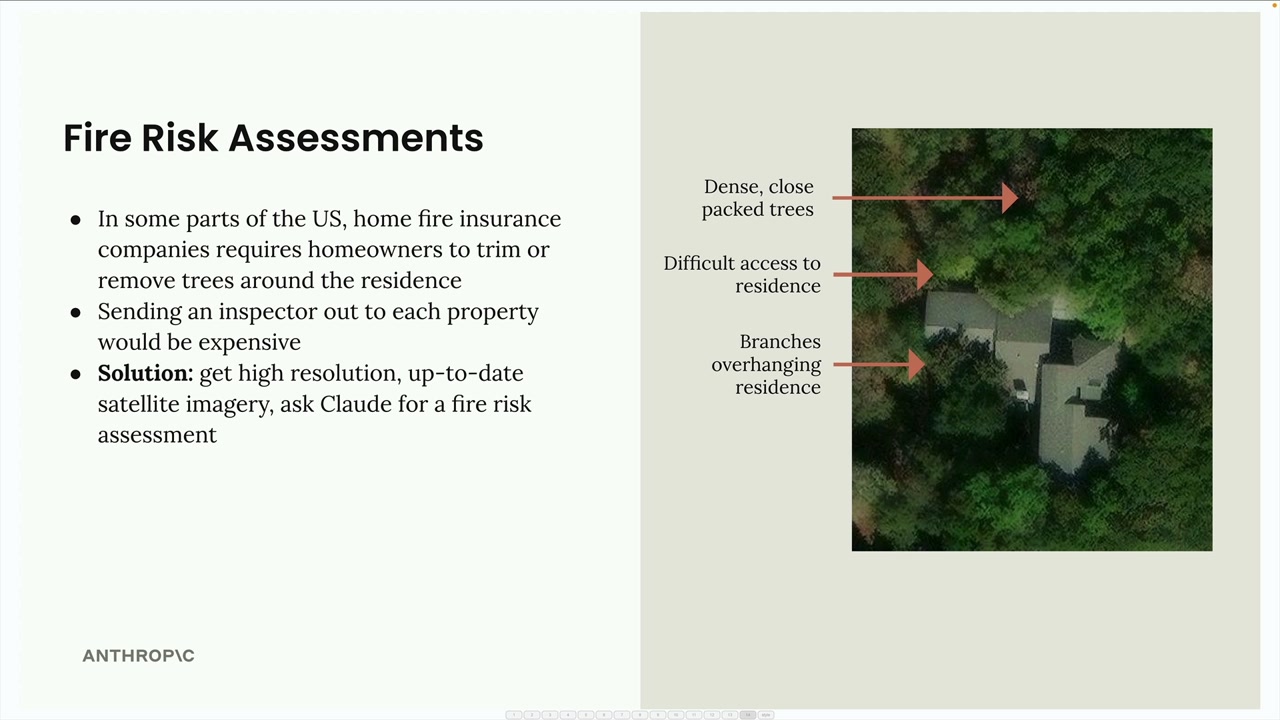
这是一个实际应用案例:为家庭保险自动化火灾风险评估。保险公司无需派遣检查员前往每处房产,而是可以使用卫星图像和Claude的分析。
该系统分析卫星图像以识别:
- 住宅附近密集、紧密排列的树木
- 应急服务难以通行的路线
- 悬垂在住宅上方的树枝
与其使用像"给出火灾风险评分"这样简单的提示,一个结构良好的提示会将分析拆分为具体步骤:
Analyze the attached satellite image of a property with these specific steps:

1. Residence identification: Locate the primary residence on the property by looking for:
   - The largest roofed structure
   - Typical residential features (driveway connection, regular geometry)
   - Distinction from other structures (garages, sheds, pools)

2. Tree overhang analysis: Examine all trees near the primary residence:
   - Identify any trees whose canopy extends directly over any portion of the roof
   - Estimate the percentage of roof covered by overhanging branches (0-25%, 25-50%, 50-75%, 75%+)
   - Note particularly dense areas of overhang

3. Fire risk assessment: For any overhanging trees, evaluate:
   - Potential wildfire vulnerability (ember catch points, continuous fuel paths to structure)
   - Proximity to chimneys, vents, or other roof openings if visible
   - Areas where branches create a "bridge" between wildland vegetation and the structure

4. Defensible space identification: Assess the property's overall vegetative structure:
   - Identify if trees connect to form a continuous canopy over or near the home
   - Note any obvious fuel ladders (vegetation that can carry fire from ground to tree to roof)

5. Fire risk rating: Based on your analysis, assign a Fire Risk Rating from 1-4:
   - Rating 1 (Low Risk): No tree branches overhanging the roof, good defensible space around the home
   - Rating 2 (Moderate Risk): Minimal overhang (<25% of roof), some separation between tree canopies
   - Rating 3 (High Risk): Significant overhang (25-50% of roof), connected tree canopies, multiple vulnerability points
   - Rating 4 (Severe Risk): Extensive overhang (>50% of roof), dense vegetation against structure

For each item above (1-5), write one sentence summarizing your findings, with your final response being the numerical rating.这个详细的提示引导Claude进行系统化分析,从而得出比简单请求更准确、更有用的评估结果。
请记住:适用于文本的提示技巧同样适用于图像。如果您希望获得可靠的结果,应该投入时间精心设计详细、结构化的提示,而不是依赖简单的问题。