什麼是工具使用?
您現有的工作流程依賴許多不同的技術——專案管理軟體、資料庫、檔案。Claude 無法自行檢查這些內容。相反地,它依賴工具(tools),這些工具讓 Claude 能夠存取外部資料與執行外部動作。
什麼是工具
簡單來說,工具是您定義並公開給 Claude 使用的函式。您描述它的功能以及它接受的輸入,而 Claude 會決定何時呼叫它。
有一件關鍵的事要牢記:Claude 不會執行工具——是您的程式碼在執行。流程如下:
- Claude 請求呼叫工具。
- 您的程式碼執行該函式。
- 結果回傳給 Claude,然後它繼續進行。
工具如何定義
工具是JSON 結構描述(schema),由三部分組成:名稱(name)、描述(description)與輸入結構描述(input schema)。您在請求主體中以 tools 陣列將它們傳遞給 Claude。
描述(description)是 Claude 用來決定是否呼叫該工具的依據。如果您寫得模糊不清,就會得到糟糕的工具使用結果。這是代理程式(agent)誤動作或無法取用現有工具的頭號原因。請務必具體明確。
以下是工具定義的樣貌:
{
  "name": "lookup_building_code",
  "description": "Look up a specific building code section by its identifier. Returns the full text of that code section.",
  "input_schema": {
    "type": "object",
    "properties": {
      "section": {
        "type": "string",
        "description": "The building code section to look up"
      }
    },
    "required": ["section"]
  }
}
那麼使用這個會發生什麼事呢?假設我們向代理程式發送一份合規報告。在第一輪,Claude 會回傳 stop_reason: "tool_use"——這就是我們的訊號。以下是該回應的樣貌:
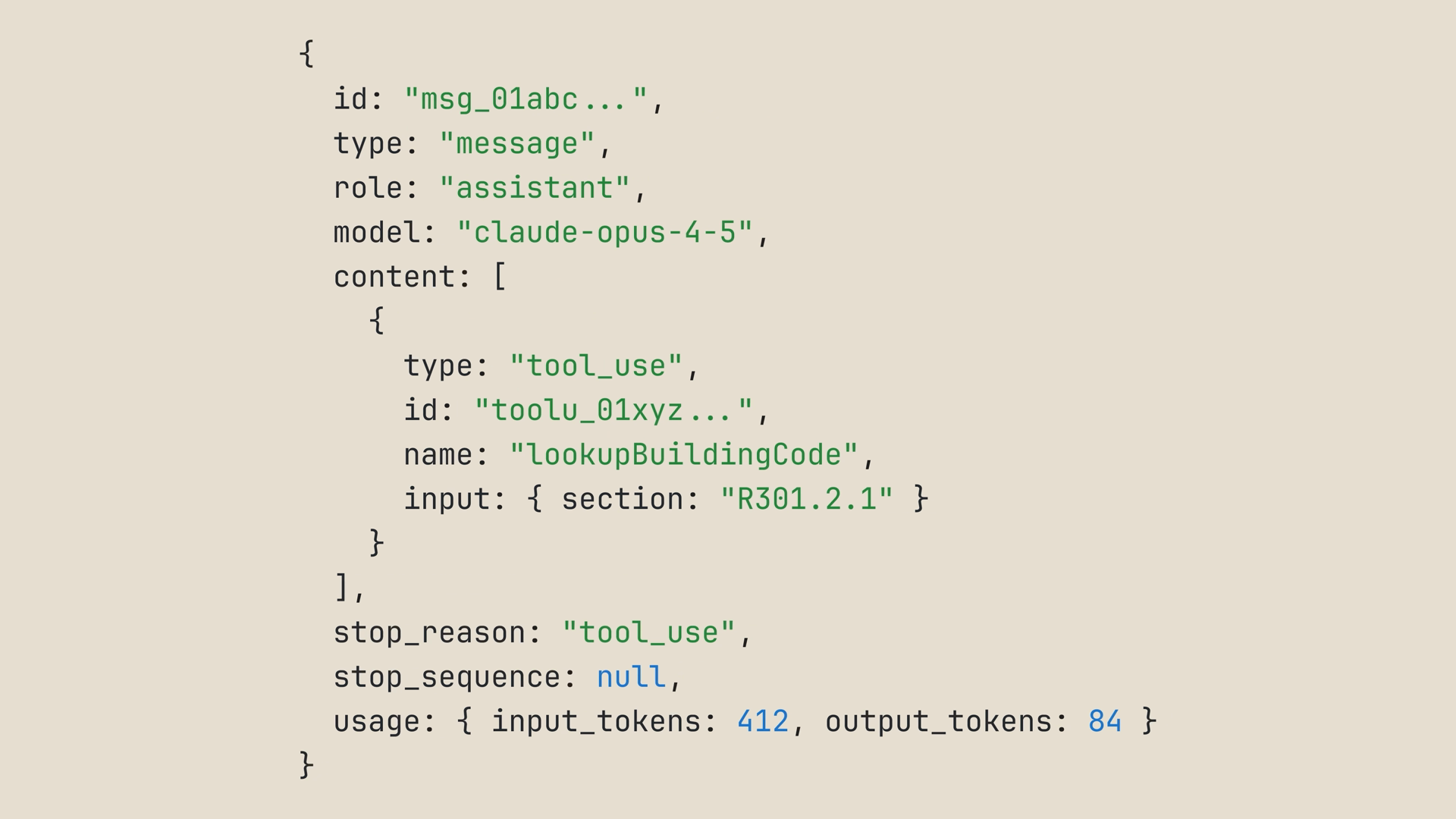
我們的迴圈以 Claude 請求的參數呼叫 lookup_building_code,然後將結果作為工具結果(tool result)回饋——這是一則使用者訊息,其中包含一個與該工具呼叫 id 相對應的 tool_result 區塊:
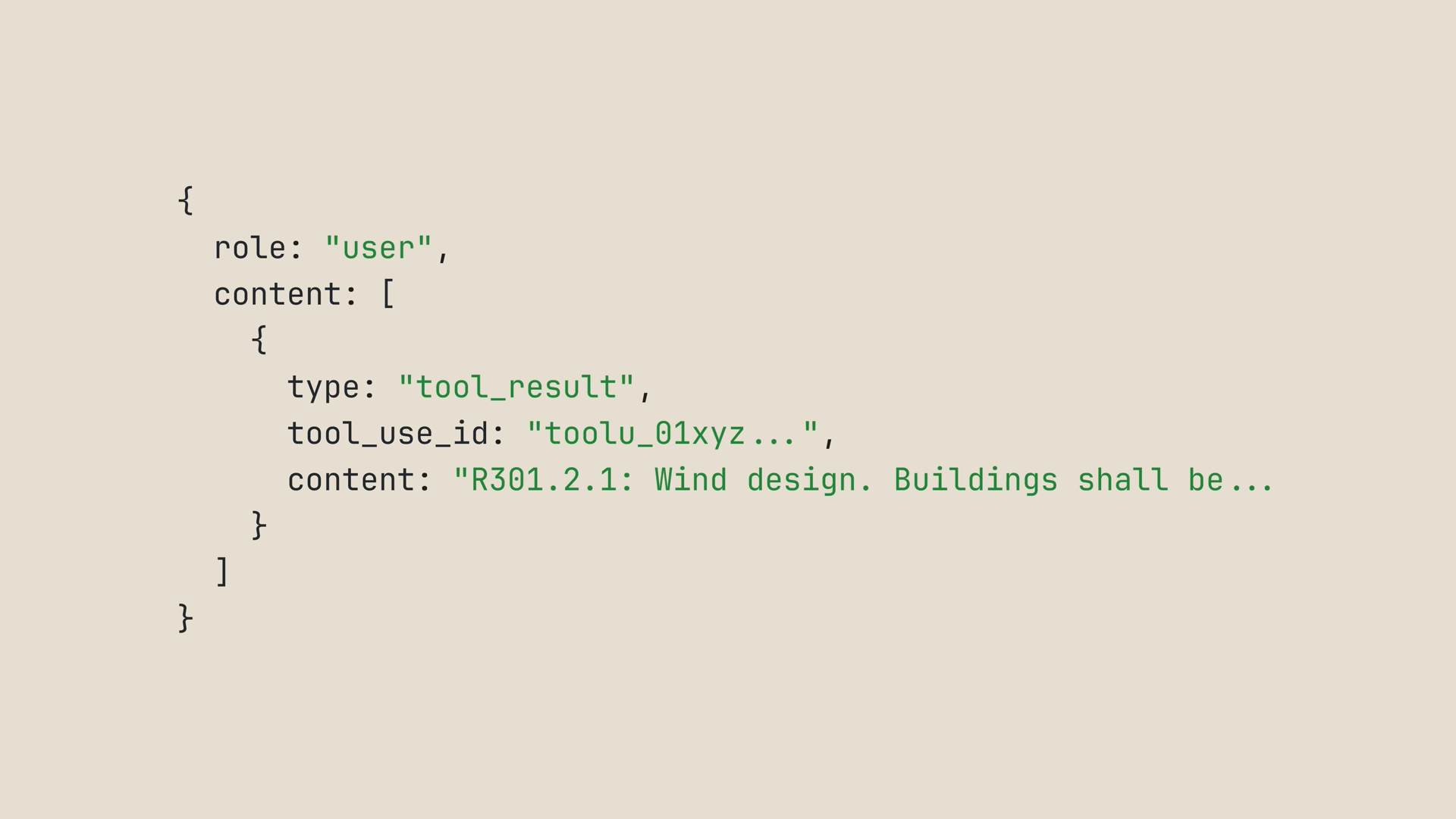
然後 Claude 會繼續進行。此時,我們可以持續呼叫工具並將結果回傳給 Claude,直到它取得所需的資訊為止。
多個工具:讓 Claude 自行選擇
單一工具固然有用,但真正有趣的部分在於給 Claude多個工具,並觀察它如何選擇使用哪一個、以什麼順序使用。
想像這個情境:您正在為一趟三天的丹佛之旅打包行李,您想知道今天的天氣以及接下來幾天的預報。因此我們宣告兩個工具,而不是一個:
const tools = [
  {
    name: "get_weather",
    description: "Get today's current weather for a city.",
    input_schema: {
      type: "object",
      properties: {
        city: { type: "string", description: "The city to check" }
      },
      required: ["city"]
    }
  },
  {
    name: "get_forecast",
    description: "Get the weather forecast for the next few days for a city.",
    input_schema: {
      type: "object",
      properties: {
        city: { type: "string", description: "The city to check" }
      },
      required: ["city"]
    }
  }
];
這個迴圈與我們之前看過的代理程式迴圈相同。唯一新增的部分是一個 runTool 函式,它透過 switch 陳述式依工具名稱分派——這個程式碼區塊正是您的程式碼實際執行的地方。它也加入了兩個寫死的查詢與開場訊息,以便您能執行它,並且使用了「您的第一次 API 呼叫」中的 client:
// 兩個寫死的查詢表。在實際應用程式中,這些會呼叫天氣服務。
const getWeather = (city) => `${city} today: 34F, snow flurries`;
const getForecast = (city) => `${city}, next three days: 38F, 45F, and 52F, sunny`;

const messages = [
  {
    role: "user",
    content:
      "I'm packing for a three-day trip to Denver. What's the weather today and over the next few days?",
  },
];

function runTool(name, input) {
  switch (name) {
    case "get_weather":
      return getWeather(input.city);
    case "get_forecast":
      return getForecast(input.city);
  }
}

while (true) {
  const response = await client.messages.create({
    model: "claude-sonnet-5",
    max_tokens: 1024,
    messages,
    tools,
  });

  if (response.stop_reason !== "tool_use") {
    // Claude 已完成──這是最終答案
    for (const block of response.content) {
      if (block.type === "text") console.log(block.text);
    }
    break;
  }

  messages.push({ role: "assistant", content: response.content });

  const toolResults = response.content
    .filter((block) => block.type === "tool_use")
    .map((block) => ({
      type: "tool_result",
      tool_use_id: block.id,
      content: runTool(block.name, block.input),
    }));

  messages.push({ role: "user", content: toolResults });
}
這就是整個模式。想要第三個工具?把它加入陣列、在 switch 中加入一個 case,就完成了。
執行這段程式碼,您會看到 Claude 呼叫 get_weather,接著呼叫 get_forecast——有時在同一輪中,有時一個接著一個。然後它會回答:打包多層衣物,預期今天會有零星降雪,整週氣溫會逐漸回暖。
現在請留意 Claude 是如何做選擇的。它讀取了描述,將您的提示對應到「今天的天氣」和「接下來幾天」,並為每一項選擇了正確的工具。這就是為什麼您的工具描述真的很重要。
工具執行器:跳過樣板程式碼
您可能已經注意到我們剛剛寫的程式碼有兩個警訊:
- 對於兩個簡單的查詢來說,那是大量的程式碼。
- 在實際的程式碼庫中,您不會想為每一個函式都手寫 JSON 結構描述。這就像把您的程式碼寫兩遍一樣。
這就是工具執行器(tool runner)派上用場的地方。它以 beta 版形式內建於 Claude SDK 中:TypeScript、Python、Ruby、C#、Go、Java 和 PHP。您只需定義每個工具一次,執行器會在內部處理整個工具使用/工具結果的迴圈。
在 TypeScript 中,執行器建議使用的輔助函式 betaZodTool(),以一個用 Zod(一個用於宣告並驗證資料結構的 TypeScript 函式庫)撰寫的簡短結構描述來描述每個工具。該輔助函式需要 Zod 3.25.0 或更新版本,全新安裝即可取得:
npm install zod您的程式碼會縮減成:描述工具、傳送提示、等待結果。以下是透過工具執行器串接的相同雙工具天氣示範:
import { betaZodTool } from "@anthropic-ai/sdk/helpers/beta/zod";
import { z } from "zod";

// 將我們手動執行過的同兩個查詢包裝起來,各自搭配一個簡短的 Zod schema
const weatherTool = betaZodTool({
  name: "get_weather",
  description: "Get today's current weather for a city.",
  inputSchema: z.object({
    city: z.string().describe("The city to check"),
  }),
  run: async ({ city }) => getWeather(city),
});

const forecastTool = betaZodTool({
  name: "get_forecast",
  description: "Get the weather forecast for the next few days for a city.",
  inputSchema: z.object({
    city: z.string().describe("The city to check"),
  }),
  run: async ({ city }) => getForecast(city),
});

const runner = client.beta.messages.toolRunner({
  model: "claude-sonnet-5",
  max_tokens: 1024,
  messages: [
    {
      role: "user",
      content:
        "I'm packing for a three-day trip to Denver. What's the weather today and over the next few days?",
    },
  ],
  tools: [weatherTool, forecastTool],
});

// 等待 runner 執行完畢,在所有工具來回呼叫都結束後取得最終訊息
const finalMessage = await runner;
for (const block of finalMessage.content) {
  if (block.type === "text") console.log(block.text);
}
相同的情境,程式碼量卻大幅減少:
- 沒有 while 迴圈,沒有 stop reason 的 switch 判斷,也不需要手動將工具結果推回訊息中——執行器會處理這一切。
- 沒有手寫的 JSON 結構描述,每個工具只需一個簡短的 Zod 結構描述,它同時也會驗證 Claude 送來的輸入。
- 每個
run函式都包裝了我們剛才手動執行過的相同查詢。 - 等待(await)執行器,會在一切底定後回傳最終的助理訊息。
執行它,您會得到相同的答案。
真正的工具會包裝您現有的程式碼
在現實生活中,您的工具不會是寫死的天氣資料。它們會包裝您應用程式中已經存在的實際函式。
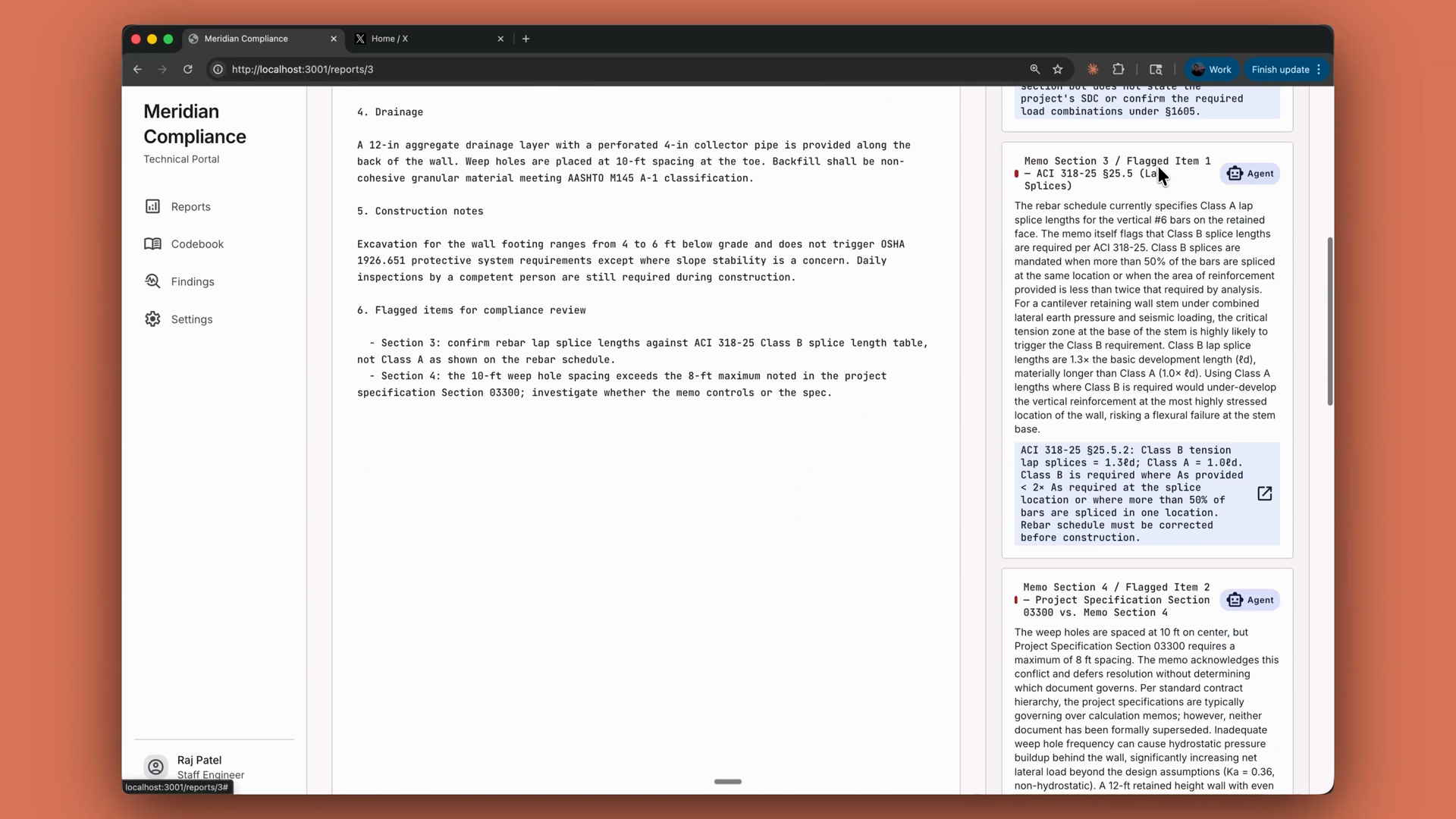
以一個合規審查代理程式為例:它的工具是圍繞著程式碼庫中已存在的 lookup_building_code 和 search_building_code 函式所建立的輕量包裝。透過工具執行器,您將這些函式各自包裝在一個擁有自己 Zod 結構描述的簡短工具定義中,而該代理程式會在它寫出的每一項調查結果中引用具體的法規條文:
小結
- 工具讓 Claude 能夠存取您的系統。 工具是您定義並公開的函式;Claude 決定何時呼叫它,而您的程式碼執行它。
- 工具是具有名稱、描述與輸入結構描述的 JSON 結構描述,以
tools陣列的形式在請求中傳遞。 - 撰寫具體明確的描述。 模糊的描述是代理程式誤動作的頭號原因。
stop_reason: "tool_use"就是您執行該工具並將結果作為工具結果回饋的訊號。- 對於多個工具,依工具名稱進行分派。新增一個工具意味著在陣列中新增一項,並新增一個 case。
- SDK 的工具執行器(在所有 Claude SDK 中皆以 beta 形式提供)會處理整個迴圈,在 TypeScript 中每個工具都是一個附帶 Zod 結構描述的簡短定義。您也可以自行執行該迴圈。
- 您可以自己執行,或將迴圈委派出去。在這個光譜的最遠端,受管理代理程式(managed agents)會將整個代理程式委派給 Anthropic。