什么是工具使用?
您现有的工作流程依赖于许多不同的技术——项目管理软件、数据库、文件。Claude 不能自己去检查这些东西。相反,它依赖于工具(tools),工具让 Claude 能够访问外部数据和执行外部操作。
什么是工具
简单来说,工具就是一个您定义并向 Claude 公开的函数。您描述它的作用和它需要的输入,由 Claude 来决定何时调用它。
这里有个需要内化的关键点:Claude 并不执行工具——是您的代码在执行。整个流程如下:
- Claude 请求调用工具。
- 您的代码执行该函数。
- 结果返回给 Claude,它继续往下进行。
工具是如何定义的
工具是由三部分组成的 JSON schema:name、description 和 input schema。您在请求体中以 tools 数组的形式将它们传给 Claude。
description(描述)是 Claude 用来判断是否调用该工具的依据。如果您写得含糊不清,就会得到糟糕的工具使用效果。这是智能体(agent)误用工具或没能用上可用工具的头号原因。描述要具体。
下面是一个工具定义的样子:
{
  "name": "lookup_building_code",
  "description": "Look up a specific building code section by its identifier. Returns the full text of that code section.",
  "input_schema": {
    "type": "object",
    "properties": {
      "section": {
        "type": "string",
        "description": "The building code section to look up"
      }
    },
    "required": ["section"]
  }
}
那么当我们使用它时会发生什么呢?假设我们向一个智能体发送一份合规报告。在第一轮中,Claude 会返回 stop_reason: "tool_use"——这就是我们的信号。该响应的样子如下:
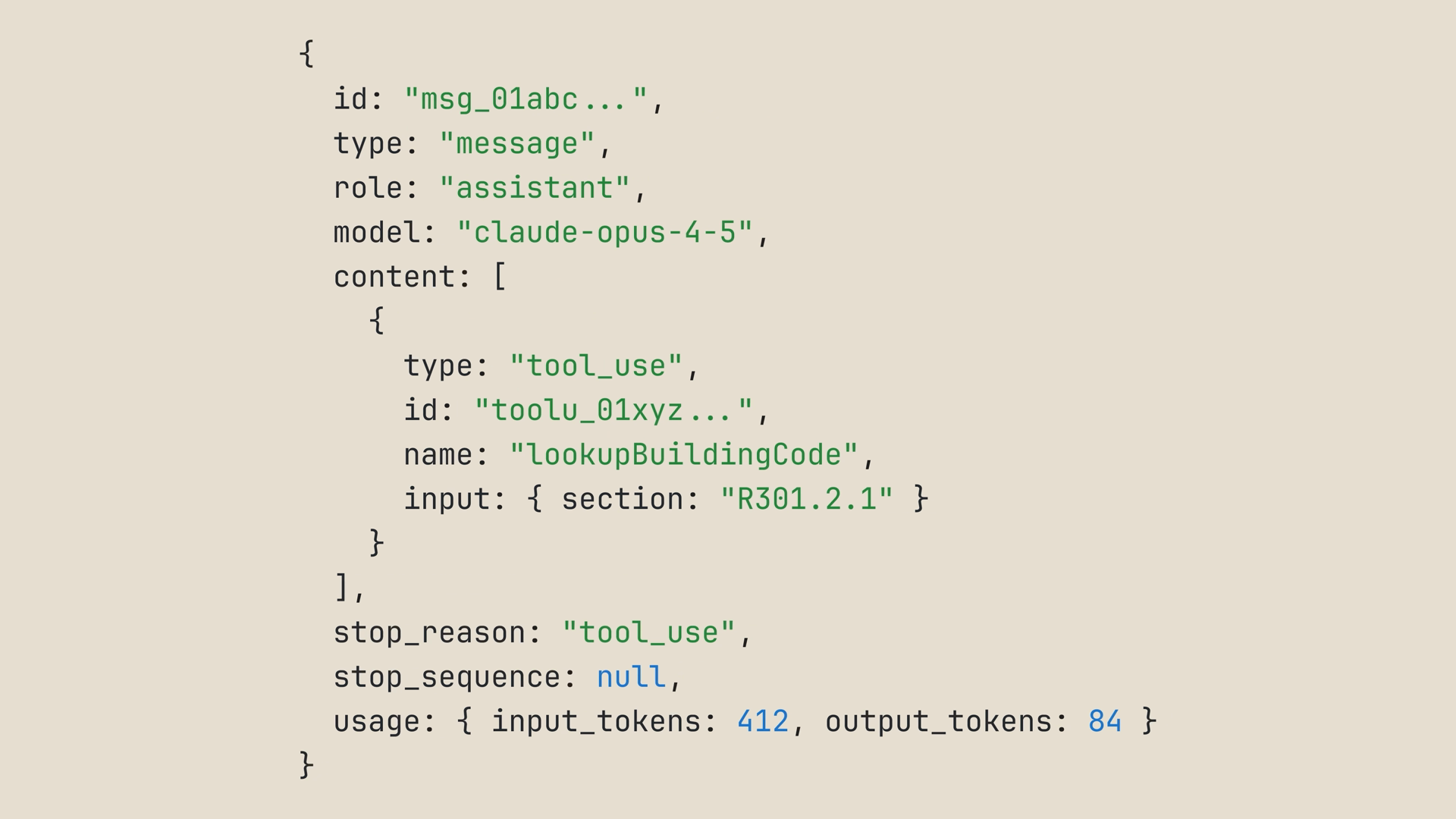
我们的循环会用 Claude 请求的参数调用 lookup_building_code,然后将结果作为工具结果(tool result)反馈回去——这是一条用户消息,其中包含一个与该工具调用 id 相关联的 tool_result 块:
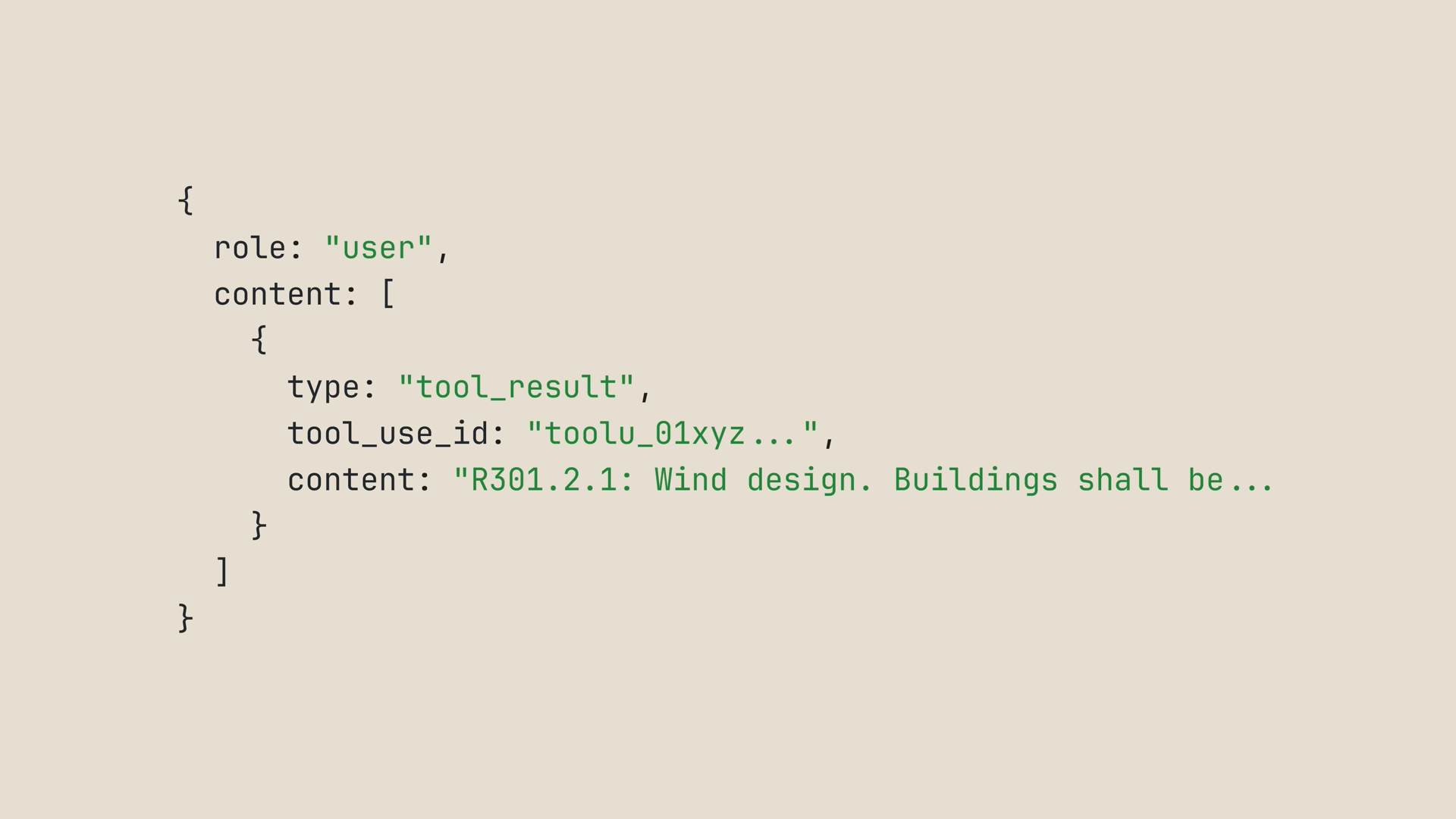
然后 Claude 继续处理。到了这一步,我们可以持续调用工具并将结果返回给 Claude,直到它得到所需的全部信息。
多个工具:让 Claude 自己挑选
一个工具很有用,但更有意思的地方在于给 Claude 提供多个工具,看它会挑选哪一个、按什么顺序使用。
设想这样一个场景:您正在为一次为期三天的丹佛之行打包行李,想同时了解今天的天气和接下来几天的天气预报。于是我们声明两个工具而不是一个:
const tools = [
  {
    name: "get_weather",
    description: "Get today's current weather for a city.",
    input_schema: {
      type: "object",
      properties: {
        city: { type: "string", description: "The city to check" }
      },
      required: ["city"]
    }
  },
  {
    name: "get_forecast",
    description: "Get the weather forecast for the next few days for a city.",
    input_schema: {
      type: "object",
      properties: {
        city: { type: "string", description: "The city to check" }
      },
      required: ["city"]
    }
  }
];
这个循环和我们之前见过的智能体循环完全相同。唯一新增的部分是一个 runTool 函数,它用一条 switch 语句按工具名称进行分发——这段代码正是您的代码真正执行的地方。它还添加了两个硬编码的查询以及开场消息,以便您能运行它,并且它使用了来自“您的第一次 API 调用”中的 client:
// 两个硬编码查找。在实际应用中,这些会调用天气服务。
const getWeather = (city) => `${city} today: 34F, snow flurries`;
const getForecast = (city) => `${city}, next three days: 38F, 45F, and 52F, sunny`;

const messages = [
  {
    role: "user",
    content:
      "I'm packing for a three-day trip to Denver. What's the weather today and over the next few days?",
  },
];

function runTool(name, input) {
  switch (name) {
    case "get_weather":
      return getWeather(input.city);
    case "get_forecast":
      return getForecast(input.city);
  }
}

while (true) {
  const response = await client.messages.create({
    model: "claude-sonnet-5",
    max_tokens: 1024,
    messages,
    tools,
  });

  if (response.stop_reason !== "tool_use") {
    // Claude 已完成——这是最终答案
    for (const block of response.content) {
      if (block.type === "text") console.log(block.text);
    }
    break;
  }

  messages.push({ role: "assistant", content: response.content });

  const toolResults = response.content
    .filter((block) => block.type === "tool_use")
    .map((block) => ({
      type: "tool_result",
      tool_use_id: block.id,
      content: runTool(block.name, block.input),
    }));

  messages.push({ role: "user", content: toolResults });
}
这就是全部的模式。想要第三个工具?把它加进数组,在 switch 里加一个 case,就完成了。
运行这段代码,您会看到 Claude 调用 get_weather,然后再调用 get_forecast——有时在同一轮,有时一前一后。然后它给出回答:建议穿分层衣物,预计今天有阵雪,本周气温会逐渐回升。
现在留意一下 Claude 是如何做出选择的。它读取了描述内容,把您的提示分别对应到“今天的天气”和“接下来几天”,并为每种需求挑选了正确的工具。这正是为什么工具描述至关重要。
工具运行器(tool runner):省去样板代码
您可能已经发现了我们刚才写的代码中的两个危险信号:
- 对于两个简单的查询来说,这是相当多的代码。
- 在真实的代码库中,您不会希望为每一个函数都手写 JSON schema。这就像把您的代码写了两遍一样。
这正是工具运行器(tool runner)的用武之地。它已在 Claude SDK 中以 beta 形式提供:TypeScript、Python、Ruby、C#、Go、Java 和 PHP。您只需定义每个工具一次,剩下的整个工具使用/工具结果循环都由运行器在内部处理。
在 TypeScript 中,运行器推荐使用的辅助函数 betaZodTool(),通过一个用 Zod(一个用于声明和校验数据结构的 TypeScript 库)编写的简短 schema 来描述每个工具。该辅助函数需要 Zod 3.25.0 或更高版本,全新安装即可满足该要求:
npm install zod您的代码会精简为:描述工具、发送提示、等待结果。下面是同样的双工具天气示例,通过工具运行器来实现:
import { betaZodTool } from "@anthropic-ai/sdk/helpers/beta/zod";
import { z } from "zod";

// 封装我们手动运行过的同样两个查询,各自配一个简短的 Zod schema
const weatherTool = betaZodTool({
  name: "get_weather",
  description: "Get today's current weather for a city.",
  inputSchema: z.object({
    city: z.string().describe("The city to check"),
  }),
  run: async ({ city }) => getWeather(city),
});

const forecastTool = betaZodTool({
  name: "get_forecast",
  description: "Get the weather forecast for the next few days for a city.",
  inputSchema: z.object({
    city: z.string().describe("The city to check"),
  }),
  run: async ({ city }) => getForecast(city),
});

const runner = client.beta.messages.toolRunner({
  model: "claude-sonnet-5",
  max_tokens: 1024,
  messages: [
    {
      role: "user",
      content:
        "I'm packing for a three-day trip to Denver. What's the weather today and over the next few days?",
    },
  ],
  tools: [weatherTool, forecastTool],
});

// 等待 runner 执行完毕,在所有工具来回调用都结束后获取最终消息
const finalMessage = await runner;
for (const block of finalMessage.content) {
  if (block.type === "text") console.log(block.text);
}
同样的场景,代码量却少了很多:
- 没有 while 循环,没有 stop reason 的 switch 判断,也不需要手动把工具结果推回消息列表——这些都由运行器来处理。
- 没有手写的 JSON schema,只需为每个工具编写一个简短的 Zod schema,它同时还会校验 Claude 发来的输入。
- 每个
run函数都包装了我们刚才手动运行过的那个同样的查询。 - 对运行器进行 await,会在一切都处理完毕后返回最终的助手消息。
运行它,您会得到同样的结果。
真实的工具封装了您现有的代码
在实际场景中,您的工具不会是硬编码的天气数据。它们会封装您的应用程序中已经存在的真实函数。
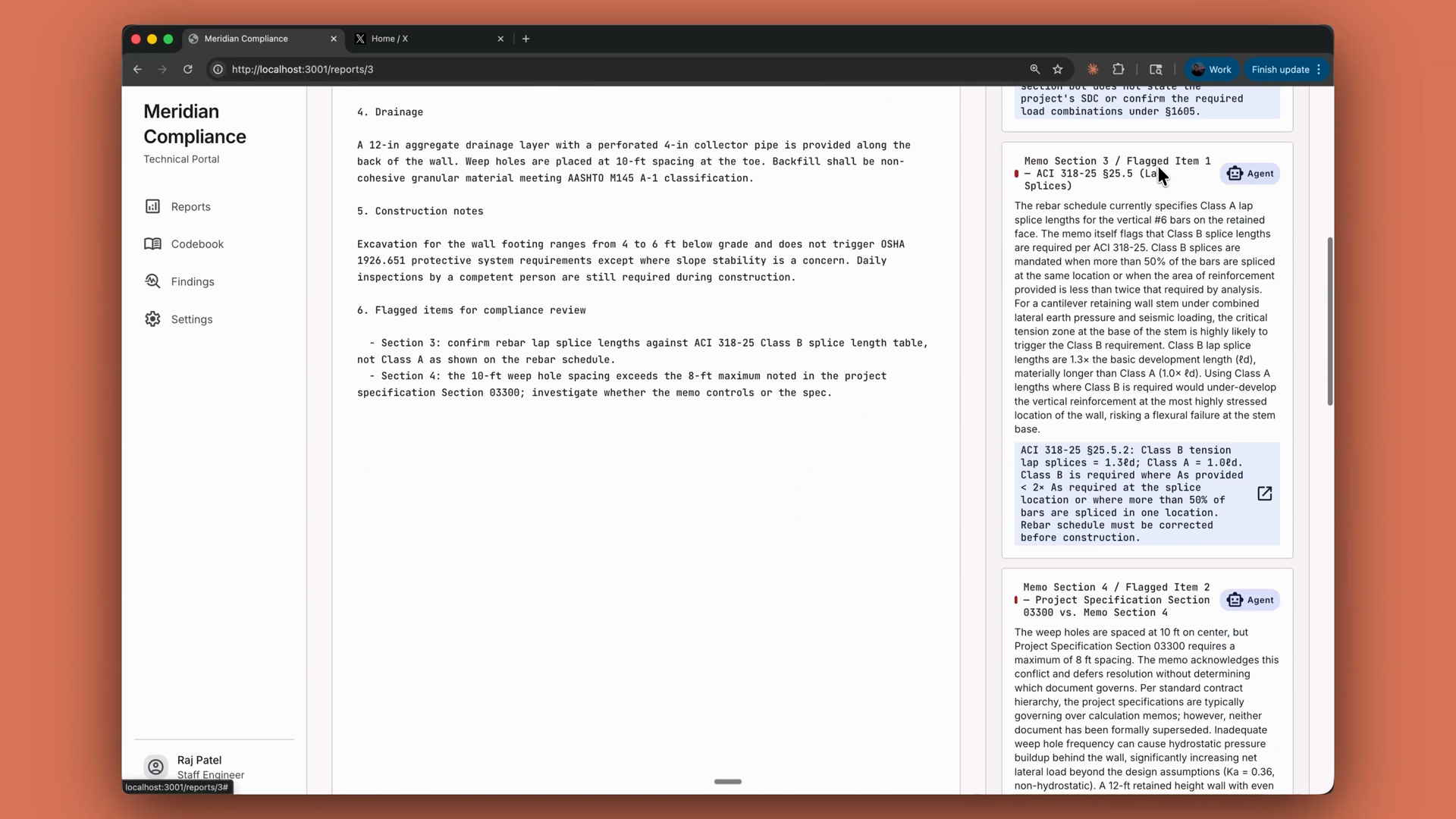
以一个合规审查智能体为例:它的工具只是对代码库中已经存在的 lookup_building_code 和 search_building_code 函数的简单封装。借助工具运行器,您可以把这些函数分别包装成带有各自 Zod schema 的简短工具定义,于是该智能体在它写出的每一条发现中都会引用具体的建筑规范条款:
小结
- 工具让 Claude 能够访问您的系统。 工具是您定义并公开的函数;由 Claude 决定何时调用它,而由您的代码来执行它。
- 工具是由 name、description 和 input schema 组成的 JSON schema,在请求中以
tools数组的形式传入。 - 编写具体的描述。 含糊不清的描述是智能体误用工具的头号原因。
stop_reason: "tool_use"就是您运行该工具并将结果作为工具结果反馈回去的信号。- 对于多个工具,按工具名称进行分发。添加一个工具意味着在数组中添加一项,并添加一个 case。
- SDK 的工具运行器(在各 Claude SDK 中以 beta 形式提供)会处理整个循环,并且在 TypeScript 中,每个工具都是带有 Zod schema 的简短定义。您也可以选择自己来运行这个循环。
- 您既可以自己执行,也可以把循环委托出去。在这个范围的最远端,托管智能体(managed agents)会把整个智能体都委托给 Anthropic。