> ## Documentation Index
> Fetch the complete documentation index at: https://claude.com/docs/llms.txt
> Use this file to discover all available pages before exploring further.
# MCP, plugins, skills, and hooks
> Extend Claude Desktop on 3P with connectors, plugin marketplaces, organization plugins, skills, and hooks for administrators and end users
Claude Desktop on third-party (3P) supports the same extensibility model as standard Claude Desktop ([MCP connectors](/docs/connectors/overview), [skills](/docs/skills/overview), and [plugins](/docs/plugins/overview)), with the key difference that administrators provision them through managed configuration and the filesystem rather than the claude.ai admin console.
There are three layers, in order of precedence:
| Layer | Provisioned by | Delivered via |
| -------------------- | -------------- | ---------------------------------------------------------------------------------------------------------------------------------------------------------------------- |
| Managed MCP servers | Admin | `managedMcpServers` configuration key |
| Organization plugins | Admin | A [plugin marketplace](#plugin-marketplaces-admin) hosted in git or over HTTPS (recommended), or a [system-wide directory](#organization-plugins-admin) on each device |
| User extensions | End user | In-app Connectors and Plugins UI |
Admins can disable the user layer entirely; see [Controlling user extensions](#controlling-user-extensions).
## Managed MCP servers (admin)
Use the `managedMcpServers` configuration key to deploy MCP servers (remote HTTP/SSE or local stdio command) to every device. These appear in the user's connector list automatically, can't be removed by the user, and support per-tool policy locks (`allow` / `ask` / `blocked`). The same key also activates the servers bundled inside the app (Microsoft 365, web search, and GitHub); see [Built-in connectors](/docs/third-party/claude-desktop/built-in-connectors).
The **Connectors** section of the [in-app configuration window](/docs/third-party/claude-desktop/in-app-configuration) provides a form for each server: name, per-tool policy, headers or a headers helper script, transport, and URL.
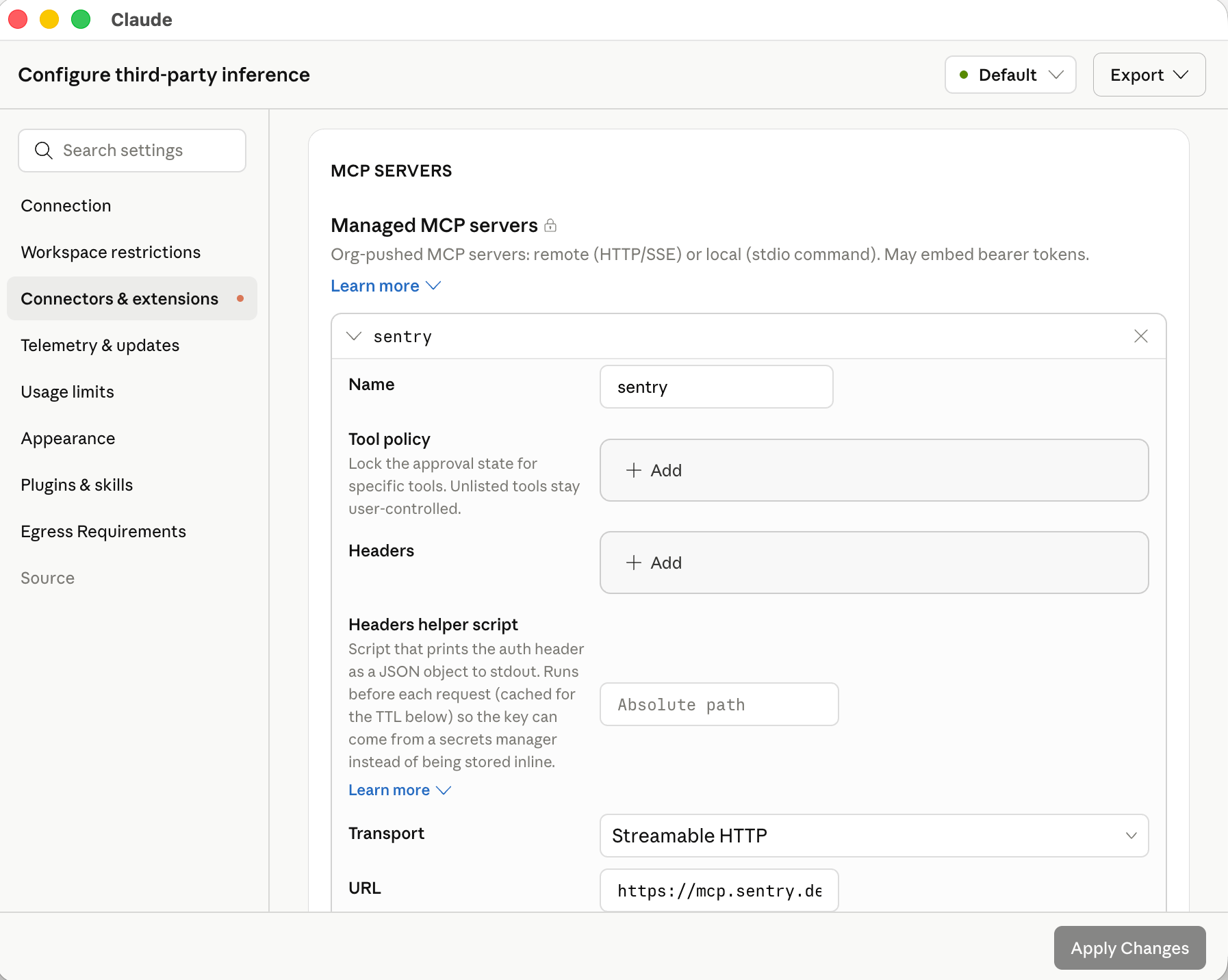 In the exported configuration, each server is one entry in the `managedMcpServers` array:
```json theme={null}
[
{
"name": "internal-search",
"transport": "http",
"url": "https://mcp.example.corp",
"oauth": true,
"toolPolicy": { "search": "allow", "delete_document": "blocked" }
},
{
"name": "ticketing",
"transport": "http",
"url": "https://tickets.example.corp/mcp",
"headersHelper": "/usr/local/bin/corp-sso-token",
"headersHelperTtlSec": 900
}
]
```
See the [`managedMcpServers` schema](/docs/third-party/claude-desktop/configuration#managedmcpservers) in the configuration reference for every field, including static headers, OAuth, and the headers-helper executable for short-lived tokens.
In the in-app configuration window, each server you add under **Connectors** has a **Test this connection** button that runs a live MCP `initialize` and `tools/list` against the server using the headers or OAuth settings you've entered, then shows the round-trip latency, the discovered tool list, or the error returned. Use it to validate reachability and credentials before exporting the configuration.
### OAuth sign-in
For a remote server entry with `oauth` set, Claude Desktop signs each user in through the system browser and receives the authorization code on a fixed loopback address. Register this redirect URI on the OAuth client, or allow it on your authorization server if clients register themselves:
```text theme={null}
http://127.0.0.1:53280/callback
```
The value is the same on every device and for every delivery method (device management, a local configuration file, or a [bootstrap server](/docs/third-party/claude-desktop/bootstrap)). On identity providers that accept any port on a loopback redirect URI (the [RFC 8252](https://datatracker.ietf.org/doc/html/rfc8252#section-7.3) native-app pattern), a registration of `http://127.0.0.1/callback` also matches.
With `"oauth": true`, Claude Desktop registers its own public client through dynamic client registration and lists this URI as the client's only redirect URI, so the authorization server must offer a registration endpoint and accept an `http` loopback redirect URI. With a client you registered yourself, set `oauth.clientId` and add the URI to that registration. If the registration uses `localhost` or another port, set `oauth.callbackHost` or `oauth.callbackPort` to match; both require `clientId`. [Set up sign-in for managed MCP servers](/docs/third-party/claude-desktop/mcp-sign-in) explains how to tell which servers need a client that you register, when a client secret is also required, and where the secret goes.
An `http` or `sse` entry with no `oauth`, no `headersHelper`, and no `Authorization` header is treated as `"oauth": true` when its server asks for authentication (Claude Desktop 1.24012.0 or later). This redirect URI applies to MCP server sign-in only. [Gateway single sign-on](/docs/third-party/claude-desktop/gateway#set-up-single-sign-on) and [bootstrap sign-in](/docs/third-party/claude-desktop/bootstrap#provider-notes) register their own loopback redirect URI.
#### How OAuth sign-in works
Claude Desktop starts sign-in only when the MCP server answers an unauthenticated request with HTTP `401`. A redirect to a web sign-in page does not start sign-in, so a gateway in front of the server must answer an unauthenticated MCP request with `401` rather than `302`.
At launch, Claude Desktop connects to every managed server without user interaction. A server with a stored token connects silently, and Claude Desktop refreshes the token first when it is near expiry. A server with no usable token appears under **Customize → Connectors** with a **Connect** button, and no browser window opens until the user selects it.
When the user selects **Connect**, Claude Desktop:
1. Starts a temporary HTTP listener on `127.0.0.1:53280` (or the host and port set in `oauth.callbackHost` and `oauth.callbackPort`). If another process holds the port, sign-in fails with a port-in-use error.
2. Reads the `401` response. The `resource_metadata` URL in its `WWW-Authenticate: Bearer` header, or else the server's `/.well-known/oauth-protected-resource` URL, leads to the protected-resource metadata. Its `resource` must be the server URL or a parent path on the same origin, and Claude Desktop uses the first authorization server it lists, or looks for authorization-server metadata on the MCP server's own origin when the server publishes no protected-resource metadata. Claude Desktop then fetches the authorization server's metadata from `/.well-known/oauth-authorization-server` or `/.well-known/openid-configuration`, and the `issuer` in the metadata must match the authorization server URL, or sign-in stops.
3. Uses the client from `oauth.clientId`, or registers one at the authorization server's registration endpoint and stores it for later sign-ins.
4. Opens the authorization URL in the system browser with a PKCE (`S256`) challenge and a `state` value. The authorization endpoint must use `https`.
5. Waits up to 120 seconds for the browser to return to the redirect URI, exchanges the code at the token endpoint, and connects to the server with the resulting access token. The listener closes when sign-in completes or fails.
To name the authorization server yourself instead of discovering it, set `oauth.clientId` together with one of `oauth.tenantId` plus `oauth.scope` (Microsoft Entra ID), a single `oauth.authorizationServer` entry (the issuer URL exactly as that server's metadata states it), or `oauth.authorizationUrl` and `oauth.tokenUrl` for a provider that serves no discovery document. With several `oauth.authorizationServer` entries, discovery runs as in step 2 and the discovered authorization server must match one of them.
Tokens are stored on the device, encrypted with the operating system's secure storage (see [Credentials](/docs/third-party/claude-desktop/data-storage#credentials)), and refreshed in the background before they expire. When the authorization request carries a scope and the authorization server's metadata lists `offline_access`, Claude Desktop adds `offline_access` so that a refresh token is issued; see `oauth.scope` and `oauth.appendOfflineAccess` in the [configuration reference](/docs/third-party/claude-desktop/configuration#managedmcpservers) to change the requested scopes. If the authorization server rejects a refresh, or issued no refresh token and the access token expires, the server returns to the **Connect** state and the user signs in again.
If sign-in fails (the callback does not arrive within 120 seconds, the authorization server rejects the registration or the redirect URI, or the identity provider completes sign-in from a host other than the authorization endpoint's), the user sees a connection error, the server keeps its **Connect** button, and `main.log` in the [logs directory](/docs/third-party/claude-desktop/data-storage#where-data-lives) records the reason. For an identity provider that completes sign-in from a different host than its authorization endpoint, list that host in `oauth.additionalRedirectReferrerHosts`. The log names the rejected host.
For a server whose OAuth sign-in goes to Microsoft Entra ID, you can run that sign-in through the [OS identity broker](/docs/third-party/claude-desktop/entra-broker) instead of the system browser by setting `authFlow` to `broker` inside the entry's `oauth` object, alongside `tenantId`, `clientId`, and `scope`. On a device where the broker is unavailable, sign-in for that server falls back to the system browser, so keep the loopback redirect URI registered as well if any devices lack the broker.
### Short-lived credentials with a headers helper
For short-lived header credentials, configure the helper per server:
| Key | Default | What it does |
| ------------------------------- | ------- | ----------------------------------------------------------------------------------------- |
| `headersHelper` | None | Executable that prints the request headers as a flat JSON object to stdout. |
| `headersHelperTtlSec` | 300 | Seconds the returned headers stay valid. |
| `headersHelperRefreshBufferSec` | 60 | Seconds before expiry that the helper re-runs. Set it above the helper's typical runtime. |
The helper follows the [`inferenceCredentialHelper`](/docs/third-party/claude-desktop/credential-helper) execution model, with four differences: no arguments, a 30-second time limit, no `CLAUDE_HELPER_CONTEXT`, and no prompting for input. The helper applies only to servers provisioned through managed configuration and never replaces the `Authorization` header on `oauth` entries.
While the connection is open, the TTL schedule triggers renewal, and a request that the server rejects with HTTP 401 or 403 also re-runs the helper and, when it returns new headers, is retried once with them (Claude Desktop 1.46388.1 or later). A failed helper run does not interrupt the connection; Claude Desktop keeps the current headers and retries on its schedule. A failure while the server is connecting shows the server as needing authentication.
Mid-session renewal requires Claude Desktop 1.21459.0 or later. Earlier versions run the helper only when the server connects.
### Supported MCP servers
Any MCP server reachable from the user's device over HTTPS works with Claude Desktop on 3P, including public servers from third parties and internal servers you build and host (including on internal gateways).
Claude Desktop does not present a TLS client certificate when connecting to MCP servers, so a server that requires mutual TLS (mTLS) client-certificate authentication fails to connect. Terminate the client-certificate requirement before the MCP endpoint (for example, at a gateway or reverse proxy), and authenticate the connection with headers or OAuth instead.
The [Claude connector directory](https://claude.com/connectors) is the canonical catalog of vetted servers. **Every connector in the directory that is not labeled "Made by Anthropic" is accessible in Claude Desktop on 3P** and can be deployed via `managedMcpServers` or installed by users. Connectors labeled "Made by Anthropic" are hosted on Anthropic infrastructure and are available only in standard Claude Desktop.
Some connectors return [MCP Apps](/docs/connectors/building/mcp-apps/getting-started), interactive widgets that Claude Desktop renders in place of a plain-text tool result. Each widget loads in a sandboxed iframe on `*.claudemcpcontent.com`, and setting [`disableNonessentialServices`](/docs/third-party/claude-desktop/configuration#disablenonessentialservices) to `true` blocks that origin, so Claude Desktop shows the connector's text result instead of the widget. The same key also blocks artifact previews and connector favicons. To keep MCP Apps rendering, leave `disableNonessentialServices` unset or `false`, and allow the widget hosts listed under [Required egress paths](/docs/third-party/claude-desktop/telemetry#required-egress-paths) at your perimeter firewall.
### Productivity suites
Google Workspace and Microsoft 365 each have a dedicated setup path:
Gmail, Calendar, Drive, Docs, and more via Google's own Workspace MCP servers. See [Google's setup guide](https://developers.google.com/workspace/guides/configure-mcp-servers) to get started.
Outlook, OneDrive, SharePoint, and Teams. Requires registering an app in your Entra tenant and an Anthropic allowlist step.
## Plugin marketplaces (admin)
A **plugin marketplace** is a catalog file (`marketplace.json`) that lists one or more Claude plugins. You host it either as a git repository or as a plain file over HTTPS. Claude Desktop fetches it on each device, lists its plugins under **Customize → Plugins → Discover → Organization** in both **Cowork** and [**Code**](/docs/third-party/claude-desktop/code), and keeps them in sync with the revision you pin. You control which plugins are available, which install automatically, and which are required.
This is the recommended way to distribute organization plugins. For a git-hosted marketplace, Claude Desktop clones with the git already installed on each device, so include git in your device baseline (Git for Windows on Windows; the Xcode Command Line Tools provide it on macOS); devices without git can use a [marketplace hosted over HTTPS](#host-the-marketplace-over-https-instead-of-git) instead. Use the [system-wide directory](#organization-plugins-admin) path when end-user devices cannot reach a git server or an HTTPS file host.
Plugin marketplaces are in beta and require Claude Desktop 1.17377.1 or later.
### Create the marketplace repository
A marketplace repository contains a `.claude-plugin/marketplace.json` file at its root that lists each plugin and its location. The format is shared with Claude Code; see [Create and distribute a plugin marketplace](https://code.claude.com/docs/en/plugin-marketplaces) for the full schema and walkthrough.
```json .claude-plugin/marketplace.json theme={null}
{
"name": "acme-internal",
"owner": { "name": "Acme IT" },
"plugins": [
{
"name": "expense-policy",
"source": "./plugins/expense-policy",
"description": "Answers questions about Acme travel and expense policy"
}
]
}
```
Put plugin content directly in the marketplace repository with a relative `source` path. Plugins whose `source` points at a different repository are listed in the Organization tab but are not fetched or auto-installed.
The marketplace `name` must match `^[A-Za-z0-9][A-Za-z0-9._-]{0,127}$` and must not be one of the reserved values `unknown`, `org`, or `org-provisioned`.
### Host the marketplace over HTTPS instead of git
When end-user devices do not have git available, or when you already run an internal web server, artifact repository, or object store, you can serve the marketplace as static files over HTTPS instead. Claude Desktop downloads the manifest and each plugin archive itself, so the endpoint has no git dependency, and the fetch goes through the same proxy and TLS path as the rest of the app.
Serve a `marketplace.json` file at any HTTPS path and package each plugin as a zip archive on the **same origin** as the manifest:
```json marketplace.json theme={null}
{
"name": "acme-internal",
"owner": { "name": "Acme IT" },
"plugins": [
{
"name": "expense-policy",
"description": "Answers questions about Acme travel and expense policy",
"source": {
"source": "archive",
"url": "https://plugins.acme.example.com/claude/expense-policy-1.3.0.zip",
"sha256": "9f2c04d1...b8e7 (64-character hex SHA-256 of the zip)"
}
}
]
}
```
Then add a `"source": "url"` entry to `allowedPluginMarketplaces` whose `url` points at this manifest (see the [field table](#configure-the-marketplace) below). Claude Desktop verifies each archive's `sha256` before unpacking it. The zip must contain the plugin at its root (a single wrapping folder is tolerated), including `.claude-plugin/plugin.json`.
Archive URLs must share the manifest's origin. That origin is the only host you need to allow through your perimeter firewall, and the only host the [marketplace credential](#marketplace-credentials) is sent to. Plugins in the manifest with any other `source` kind, or an archive on a different origin, are listed for users but never fetched.
If any archive in a fetch fails to download or fails its digest check, Claude Desktop installs nothing from that fetch and retries on the next sync.
### Configure the marketplace
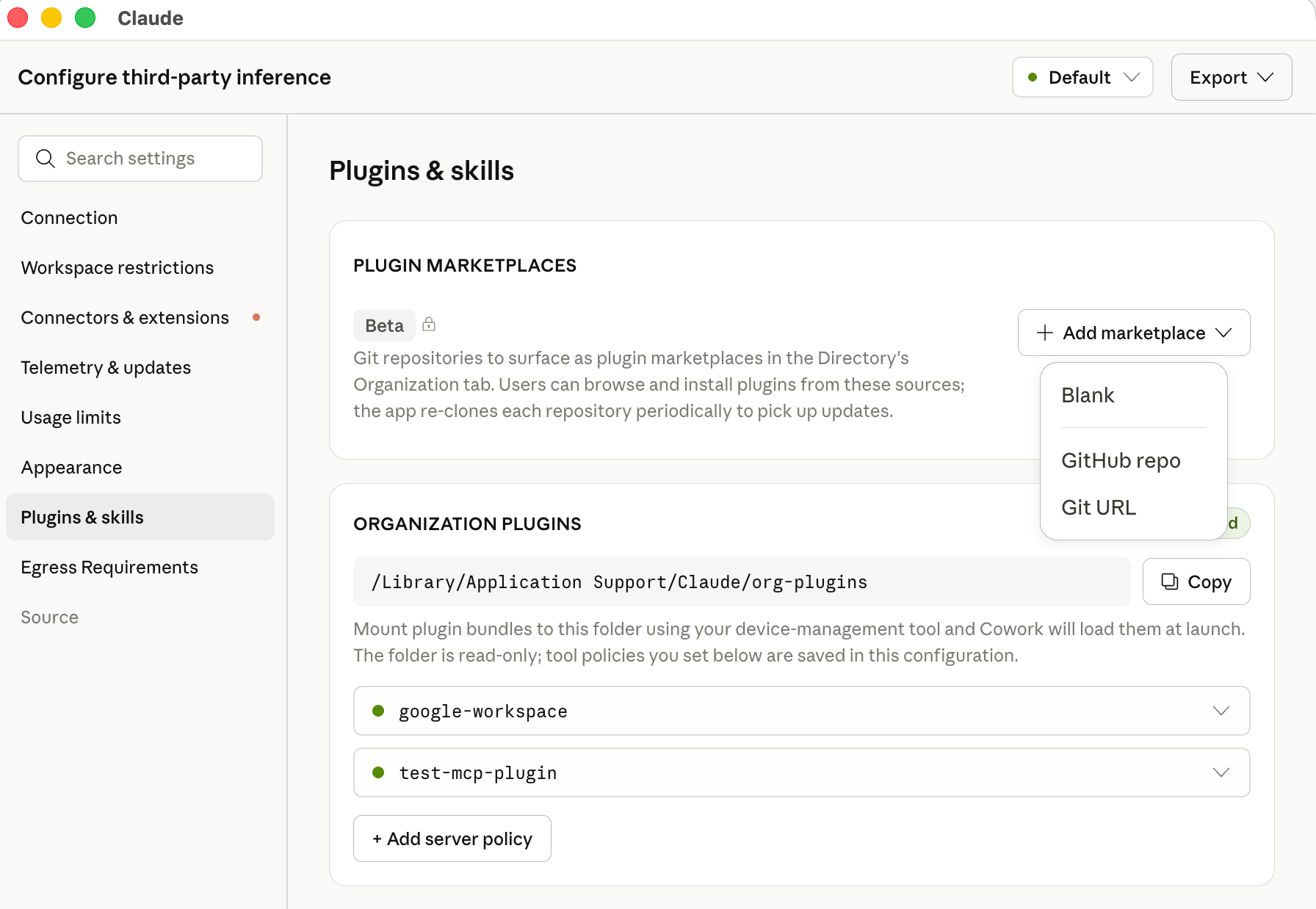
You can add marketplaces directly in the [in-app configuration window](/docs/third-party/claude-desktop/in-app-configuration): in the **Plugins** section, click **Add marketplace** and choose **Blank**, **GitHub repo**, **Git URL**, or **Marketplace URL**. The form validates the entry and exports the encoded JSON for you.
In the exported configuration, each server is one entry in the `managedMcpServers` array:
```json theme={null}
[
{
"name": "internal-search",
"transport": "http",
"url": "https://mcp.example.corp",
"oauth": true,
"toolPolicy": { "search": "allow", "delete_document": "blocked" }
},
{
"name": "ticketing",
"transport": "http",
"url": "https://tickets.example.corp/mcp",
"headersHelper": "/usr/local/bin/corp-sso-token",
"headersHelperTtlSec": 900
}
]
```
See the [`managedMcpServers` schema](/docs/third-party/claude-desktop/configuration#managedmcpservers) in the configuration reference for every field, including static headers, OAuth, and the headers-helper executable for short-lived tokens.
In the in-app configuration window, each server you add under **Connectors** has a **Test this connection** button that runs a live MCP `initialize` and `tools/list` against the server using the headers or OAuth settings you've entered, then shows the round-trip latency, the discovered tool list, or the error returned. Use it to validate reachability and credentials before exporting the configuration.
### OAuth sign-in
For a remote server entry with `oauth` set, Claude Desktop signs each user in through the system browser and receives the authorization code on a fixed loopback address. Register this redirect URI on the OAuth client, or allow it on your authorization server if clients register themselves:
```text theme={null}
http://127.0.0.1:53280/callback
```
The value is the same on every device and for every delivery method (device management, a local configuration file, or a [bootstrap server](/docs/third-party/claude-desktop/bootstrap)). On identity providers that accept any port on a loopback redirect URI (the [RFC 8252](https://datatracker.ietf.org/doc/html/rfc8252#section-7.3) native-app pattern), a registration of `http://127.0.0.1/callback` also matches.
With `"oauth": true`, Claude Desktop registers its own public client through dynamic client registration and lists this URI as the client's only redirect URI, so the authorization server must offer a registration endpoint and accept an `http` loopback redirect URI. With a client you registered yourself, set `oauth.clientId` and add the URI to that registration. If the registration uses `localhost` or another port, set `oauth.callbackHost` or `oauth.callbackPort` to match; both require `clientId`. [Set up sign-in for managed MCP servers](/docs/third-party/claude-desktop/mcp-sign-in) explains how to tell which servers need a client that you register, when a client secret is also required, and where the secret goes.
An `http` or `sse` entry with no `oauth`, no `headersHelper`, and no `Authorization` header is treated as `"oauth": true` when its server asks for authentication (Claude Desktop 1.24012.0 or later). This redirect URI applies to MCP server sign-in only. [Gateway single sign-on](/docs/third-party/claude-desktop/gateway#set-up-single-sign-on) and [bootstrap sign-in](/docs/third-party/claude-desktop/bootstrap#provider-notes) register their own loopback redirect URI.
#### How OAuth sign-in works
Claude Desktop starts sign-in only when the MCP server answers an unauthenticated request with HTTP `401`. A redirect to a web sign-in page does not start sign-in, so a gateway in front of the server must answer an unauthenticated MCP request with `401` rather than `302`.
At launch, Claude Desktop connects to every managed server without user interaction. A server with a stored token connects silently, and Claude Desktop refreshes the token first when it is near expiry. A server with no usable token appears under **Customize → Connectors** with a **Connect** button, and no browser window opens until the user selects it.
When the user selects **Connect**, Claude Desktop:
1. Starts a temporary HTTP listener on `127.0.0.1:53280` (or the host and port set in `oauth.callbackHost` and `oauth.callbackPort`). If another process holds the port, sign-in fails with a port-in-use error.
2. Reads the `401` response. The `resource_metadata` URL in its `WWW-Authenticate: Bearer` header, or else the server's `/.well-known/oauth-protected-resource` URL, leads to the protected-resource metadata. Its `resource` must be the server URL or a parent path on the same origin, and Claude Desktop uses the first authorization server it lists, or looks for authorization-server metadata on the MCP server's own origin when the server publishes no protected-resource metadata. Claude Desktop then fetches the authorization server's metadata from `/.well-known/oauth-authorization-server` or `/.well-known/openid-configuration`, and the `issuer` in the metadata must match the authorization server URL, or sign-in stops.
3. Uses the client from `oauth.clientId`, or registers one at the authorization server's registration endpoint and stores it for later sign-ins.
4. Opens the authorization URL in the system browser with a PKCE (`S256`) challenge and a `state` value. The authorization endpoint must use `https`.
5. Waits up to 120 seconds for the browser to return to the redirect URI, exchanges the code at the token endpoint, and connects to the server with the resulting access token. The listener closes when sign-in completes or fails.
To name the authorization server yourself instead of discovering it, set `oauth.clientId` together with one of `oauth.tenantId` plus `oauth.scope` (Microsoft Entra ID), a single `oauth.authorizationServer` entry (the issuer URL exactly as that server's metadata states it), or `oauth.authorizationUrl` and `oauth.tokenUrl` for a provider that serves no discovery document. With several `oauth.authorizationServer` entries, discovery runs as in step 2 and the discovered authorization server must match one of them.
Tokens are stored on the device, encrypted with the operating system's secure storage (see [Credentials](/docs/third-party/claude-desktop/data-storage#credentials)), and refreshed in the background before they expire. When the authorization request carries a scope and the authorization server's metadata lists `offline_access`, Claude Desktop adds `offline_access` so that a refresh token is issued; see `oauth.scope` and `oauth.appendOfflineAccess` in the [configuration reference](/docs/third-party/claude-desktop/configuration#managedmcpservers) to change the requested scopes. If the authorization server rejects a refresh, or issued no refresh token and the access token expires, the server returns to the **Connect** state and the user signs in again.
If sign-in fails (the callback does not arrive within 120 seconds, the authorization server rejects the registration or the redirect URI, or the identity provider completes sign-in from a host other than the authorization endpoint's), the user sees a connection error, the server keeps its **Connect** button, and `main.log` in the [logs directory](/docs/third-party/claude-desktop/data-storage#where-data-lives) records the reason. For an identity provider that completes sign-in from a different host than its authorization endpoint, list that host in `oauth.additionalRedirectReferrerHosts`. The log names the rejected host.
For a server whose OAuth sign-in goes to Microsoft Entra ID, you can run that sign-in through the [OS identity broker](/docs/third-party/claude-desktop/entra-broker) instead of the system browser by setting `authFlow` to `broker` inside the entry's `oauth` object, alongside `tenantId`, `clientId`, and `scope`. On a device where the broker is unavailable, sign-in for that server falls back to the system browser, so keep the loopback redirect URI registered as well if any devices lack the broker.
### Short-lived credentials with a headers helper
For short-lived header credentials, configure the helper per server:
| Key | Default | What it does |
| ------------------------------- | ------- | ----------------------------------------------------------------------------------------- |
| `headersHelper` | None | Executable that prints the request headers as a flat JSON object to stdout. |
| `headersHelperTtlSec` | 300 | Seconds the returned headers stay valid. |
| `headersHelperRefreshBufferSec` | 60 | Seconds before expiry that the helper re-runs. Set it above the helper's typical runtime. |
The helper follows the [`inferenceCredentialHelper`](/docs/third-party/claude-desktop/credential-helper) execution model, with four differences: no arguments, a 30-second time limit, no `CLAUDE_HELPER_CONTEXT`, and no prompting for input. The helper applies only to servers provisioned through managed configuration and never replaces the `Authorization` header on `oauth` entries.
While the connection is open, the TTL schedule triggers renewal, and a request that the server rejects with HTTP 401 or 403 also re-runs the helper and, when it returns new headers, is retried once with them (Claude Desktop 1.46388.1 or later). A failed helper run does not interrupt the connection; Claude Desktop keeps the current headers and retries on its schedule. A failure while the server is connecting shows the server as needing authentication.
Mid-session renewal requires Claude Desktop 1.21459.0 or later. Earlier versions run the helper only when the server connects.
### Supported MCP servers
Any MCP server reachable from the user's device over HTTPS works with Claude Desktop on 3P, including public servers from third parties and internal servers you build and host (including on internal gateways).
Claude Desktop does not present a TLS client certificate when connecting to MCP servers, so a server that requires mutual TLS (mTLS) client-certificate authentication fails to connect. Terminate the client-certificate requirement before the MCP endpoint (for example, at a gateway or reverse proxy), and authenticate the connection with headers or OAuth instead.
The [Claude connector directory](https://claude.com/connectors) is the canonical catalog of vetted servers. **Every connector in the directory that is not labeled "Made by Anthropic" is accessible in Claude Desktop on 3P** and can be deployed via `managedMcpServers` or installed by users. Connectors labeled "Made by Anthropic" are hosted on Anthropic infrastructure and are available only in standard Claude Desktop.
Some connectors return [MCP Apps](/docs/connectors/building/mcp-apps/getting-started), interactive widgets that Claude Desktop renders in place of a plain-text tool result. Each widget loads in a sandboxed iframe on `*.claudemcpcontent.com`, and setting [`disableNonessentialServices`](/docs/third-party/claude-desktop/configuration#disablenonessentialservices) to `true` blocks that origin, so Claude Desktop shows the connector's text result instead of the widget. The same key also blocks artifact previews and connector favicons. To keep MCP Apps rendering, leave `disableNonessentialServices` unset or `false`, and allow the widget hosts listed under [Required egress paths](/docs/third-party/claude-desktop/telemetry#required-egress-paths) at your perimeter firewall.
### Productivity suites
Google Workspace and Microsoft 365 each have a dedicated setup path:
Gmail, Calendar, Drive, Docs, and more via Google's own Workspace MCP servers. See [Google's setup guide](https://developers.google.com/workspace/guides/configure-mcp-servers) to get started.
Outlook, OneDrive, SharePoint, and Teams. Requires registering an app in your Entra tenant and an Anthropic allowlist step.
## Plugin marketplaces (admin)
A **plugin marketplace** is a catalog file (`marketplace.json`) that lists one or more Claude plugins. You host it either as a git repository or as a plain file over HTTPS. Claude Desktop fetches it on each device, lists its plugins under **Customize → Plugins → Discover → Organization** in both **Cowork** and [**Code**](/docs/third-party/claude-desktop/code), and keeps them in sync with the revision you pin. You control which plugins are available, which install automatically, and which are required.
This is the recommended way to distribute organization plugins. For a git-hosted marketplace, Claude Desktop clones with the git already installed on each device, so include git in your device baseline (Git for Windows on Windows; the Xcode Command Line Tools provide it on macOS); devices without git can use a [marketplace hosted over HTTPS](#host-the-marketplace-over-https-instead-of-git) instead. Use the [system-wide directory](#organization-plugins-admin) path when end-user devices cannot reach a git server or an HTTPS file host.
Plugin marketplaces are in beta and require Claude Desktop 1.17377.1 or later.
### Create the marketplace repository
A marketplace repository contains a `.claude-plugin/marketplace.json` file at its root that lists each plugin and its location. The format is shared with Claude Code; see [Create and distribute a plugin marketplace](https://code.claude.com/docs/en/plugin-marketplaces) for the full schema and walkthrough.
```json .claude-plugin/marketplace.json theme={null}
{
"name": "acme-internal",
"owner": { "name": "Acme IT" },
"plugins": [
{
"name": "expense-policy",
"source": "./plugins/expense-policy",
"description": "Answers questions about Acme travel and expense policy"
}
]
}
```
Put plugin content directly in the marketplace repository with a relative `source` path. Plugins whose `source` points at a different repository are listed in the Organization tab but are not fetched or auto-installed.
The marketplace `name` must match `^[A-Za-z0-9][A-Za-z0-9._-]{0,127}$` and must not be one of the reserved values `unknown`, `org`, or `org-provisioned`.
### Host the marketplace over HTTPS instead of git
When end-user devices do not have git available, or when you already run an internal web server, artifact repository, or object store, you can serve the marketplace as static files over HTTPS instead. Claude Desktop downloads the manifest and each plugin archive itself, so the endpoint has no git dependency, and the fetch goes through the same proxy and TLS path as the rest of the app.
Serve a `marketplace.json` file at any HTTPS path and package each plugin as a zip archive on the **same origin** as the manifest:
```json marketplace.json theme={null}
{
"name": "acme-internal",
"owner": { "name": "Acme IT" },
"plugins": [
{
"name": "expense-policy",
"description": "Answers questions about Acme travel and expense policy",
"source": {
"source": "archive",
"url": "https://plugins.acme.example.com/claude/expense-policy-1.3.0.zip",
"sha256": "9f2c04d1...b8e7 (64-character hex SHA-256 of the zip)"
}
}
]
}
```
Then add a `"source": "url"` entry to `allowedPluginMarketplaces` whose `url` points at this manifest (see the [field table](#configure-the-marketplace) below). Claude Desktop verifies each archive's `sha256` before unpacking it. The zip must contain the plugin at its root (a single wrapping folder is tolerated), including `.claude-plugin/plugin.json`.
Archive URLs must share the manifest's origin. That origin is the only host you need to allow through your perimeter firewall, and the only host the [marketplace credential](#marketplace-credentials) is sent to. Plugins in the manifest with any other `source` kind, or an archive on a different origin, are listed for users but never fetched.
If any archive in a fetch fails to download or fails its digest check, Claude Desktop installs nothing from that fetch and retries on the next sync.
### Configure the marketplace
You can add marketplaces directly in the [in-app configuration window](/docs/third-party/claude-desktop/in-app-configuration): in the **Plugins** section, click **Add marketplace** and choose **Blank**, **GitHub repo**, **Git URL**, or **Marketplace URL**. The form validates the entry and exports the encoded JSON for you.
 To write the configuration by hand instead, add the repository to the [`allowedPluginMarketplaces`](/docs/third-party/claude-desktop/configuration) configuration key. The key is read from an MDM profile, local configuration, or the [bootstrap server](/docs/third-party/claude-desktop/bootstrap) response. In an MDM profile the value is a JSON array encoded as a string (see [Value types](/docs/third-party/claude-desktop/configuration#value-types)). In a local configuration file or the bootstrap response the value is a native JSON array.
```xml .mobileconfig (macOS) theme={null}
allowedPluginMarketplaces
[{"source":"github","repo":"acme-corp/claude-plugins","ref":"a1b2c3d4e5f6a7b8c9d0e1f2a3b4c5d6e7f8a9b0","credentialKind":"userGit","installationPreference":"auto_install"}]
```
On Windows, write the same string to the `allowedPluginMarketplaces` value in the registry policy key your deployment already uses (`HKLM\SOFTWARE\Policies\Claude` for machine policy). Keep the value in the same hive as the rest of your configuration: when machine policy is present, the app ignores user policy entirely; see [Deploy the configuration](/docs/third-party/claude-desktop/mdm#4-deploy-the-configuration) for the exact rule. For GitLab, Bitbucket, or a self-hosted git server, use `"source": "git"` with a full HTTPS `url` instead of `repo`. For a [marketplace hosted over HTTPS without git](#host-the-marketplace-over-https-instead-of-git), use `"source": "url"` with `url` pointing at the `marketplace.json` file:
```json theme={null}
[{"source":"url","url":"https://plugins.acme.example.com/claude/marketplace.json","credentialKind":"inferenceCredential","installationPreference":"available"}]
```
| Field | Description |
| ------------------------ | -------------------------------------------------------------------------------------------------------------------------------------------------------------------------------------------------------------------------------- |
| `source` | **Required.** `"github"` (with `repo`), `"git"` (with `url`), or `"url"` (with `url` pointing at a hosted `marketplace.json`). |
| `repo` | GitHub repository in `owner/name` format. `github` sources only. |
| `url` | For `git` sources, the full HTTPS clone URL. For `url` sources, the HTTPS address of the `marketplace.json` file. Use a bare URL with no embedded credentials or query string, and set `credentialKind` for authentication. |
| `ref` | Branch name, tag name, or full 40-character commit SHA. Git sources only. **Required, and must be a full commit SHA,** when `installationPreference` is `"auto_install"` or `"required"`. |
| `path` | Subdirectory containing `.claude-plugin/marketplace.json` when not at the repository root. Git sources only. |
| `manifestSha256` | 64-character hex SHA-256 of the exact `marketplace.json` file to accept. `url` sources only. **Required** when `installationPreference` is `"auto_install"` or `"required"`; a served manifest with any other digest is refused. |
| `expectedName` | If set, the fetch is rejected unless the `name` in `marketplace.json` matches this value exactly, so a change to the manifest name cannot silently replace another configured marketplace. |
| `credentialKind` | `"anonymous"` (default), `"userGit"`, `"credentialHelper"`, or (for `url` sources) `"inferenceCredential"`. See [Marketplace credentials](#marketplace-credentials). |
| `credentialHelper` | Path to an executable that prints an access token on stdout. Required, and only valid, when `credentialKind` is `"credentialHelper"`. |
| `installationPreference` | `"available"` (default), `"auto_install"`, or `"required"`. See [Marketplace installation preferences](#marketplace-installation-preferences). |
You can configure multiple marketplaces, and each appears as its own sub-tab under **Organization** in the **Directory**. If an admin-configured marketplace has the same `repo`, `url`, or manifest `name` as one the user added themselves, the admin entry replaces the user's.
### Marketplace installation preferences
| `installationPreference` | Behavior |
| ------------------------ | ------------------------------------------------------------------------------------------------------------------------------------------------------------------------------------------------------------- |
| `"available"` | Plugins appear in the Organization tab for users to install manually. Nothing is installed automatically. |
| `"auto_install"` | Every plugin is installed automatically the first time the pinned `ref` is seen. Users can uninstall individual plugins; when you later change the `ref`, each plugin is installed again at the new revision. |
| `"required"` | Every plugin is installed automatically and re-asserted on every sync. Users cannot uninstall or disable required plugins. |
`"auto_install"` and `"required"` marketplaces must carry an admin-side content pin so the exact plugin content deployed to every device is deterministic and auditable. Git sources must set `ref` to a full 40-character commit SHA; Claude Desktop refuses to auto-install from a branch or tag name. `url` sources must set `manifestSha256` to the SHA-256 of the exact `marketplace.json` bytes and give every archive a `sha256`; Claude Desktop refuses a served manifest with a different digest and skips unpinned archives.
#### Per-plugin auto-install from a trusted origin
A `url` marketplace served from your deployment's own [inference gateway](/docs/third-party/claude-desktop/gateway) origin (`inferenceGatewayBaseUrl`) or [bootstrap server](/docs/third-party/claude-desktop/bootstrap) origin (`bootstrapUrl`) can mark individual plugins for automatic installation inside `marketplace.json` itself, without a `manifestSha256` pin in configuration. Leave the entry's `installationPreference` at `"available"` and set `installationPreference` on each plugin you want installed automatically:
```json marketplace.json theme={null}
{
"name": "acme-internal",
"owner": { "name": "Acme IT" },
"plugins": [
{
"name": "expense-policy",
"installationPreference": "auto_install",
"source": {
"source": "archive",
"url": "https://plugins.acme.example.com/claude/expense-policy-1.3.0.zip",
"sha256": "9f2c04d1...b8e7"
}
}
]
}
```
Each plugin marked this way still needs a `sha256` on its archive. Claude Desktop re-fetches the manifest periodically and picks up a newly published version without a configuration change or an app relaunch. A plugin the user removes stays removed.
Claude Desktop honors these per-plugin marks only when the manifest is served from your inference gateway's or bootstrap server's own origin, because those hosts already carry your deployment's configuration and credentials. On any other origin the marks are ignored, and the marketplace behaves as `"available"`. Entry-level `"auto_install"` and `"required"` continue to require the [admin-side content pin](#marketplace-installation-preferences) on every origin.
### Marketplace credentials
Claude Desktop fetches marketplaces on the host operating system, outside the Cowork VM. The credential is used only for this fetch and is never passed into the VM or exposed to the model.
| `credentialKind` | How it authenticates |
| ----------------------- | ----------------------------------------------------------------------------------------------------------------------------------------------------------------------------------------------------------------------------------------------------------------------------------------------------------------------------------------------------------------------------------------------------------------------------------------------------------------------------------------------------------------------------------------------------------------------------------------------------------------------------------------------------------------------------------------------------------------------------------------------------------------------------------------------------------------------------------------------------------------------------------------------------------------------------------------------------------------------------------------------------------------------------------------------------------------------------------------- |
| `"anonymous"` | No credential is sent. Use for public repositories or unauthenticated file hosts. |
| `"userGit"` | Uses the git credential helpers already configured for the signed-in OS user (for example, `git-credential-manager`, macOS Keychain, or a GitHub CLI credential helper). Use when each user already has read access through their own account. For `url` sources, the same credential is sent as HTTP Basic on the manifest and archive requests. |
| `"credentialHelper"` | Runs the executable at `credentialHelper`. If it prints a bare token, the token is used as the git password for username `x-access-token` (accepted by GitHub, GitLab, and Azure DevOps) and, for `url` sources, sent as `Authorization: Bearer ` on the manifest and archive requests. For hosts that need a particular username, print git-credential lines `username=` and `password=` instead (for example `x-token-auth` for Bitbucket Data Center access tokens, or `gitlab+deploy-token-N` for a GitLab deploy token); `url` sources then use HTTP Basic. Print `authtype=Bearer` and `credential=` to force a bearer header. Unlike an inference credential helper, it does not accept JSON output. Username forms require Claude Desktop 1.37937.0 or later. Otherwise follows the execution model of an [inference credential helper](/docs/third-party/claude-desktop/credential-helper). |
| `"inferenceCredential"` | `url` sources only. Sends the credentials Claude Desktop already sends to your inference gateway or to your [bootstrap server](/docs/third-party/claude-desktop/bootstrap), so a marketplace hosted on either is private to signed-in members without a separate credential. On the gateway's origin it sends the same `Authorization` bearer as inference and works for [gateway single sign-on](/docs/third-party/claude-desktop/gateway#single-sign-on-with-your-identity-provider), a [credential helper](/docs/third-party/claude-desktop/credential-helper), and bearer-scheme API keys. On the bootstrap server's origin (Claude Desktop 1.37937.0 or later) it sends the bootstrap sign-in token or your `bootstrapHeaders` and `bootstrapHeadersHelper` headers. Claude Desktop sends a credential only when the marketplace URL is on one of those two origins. When there is nothing to send yet (no sign-in held and no bootstrap headers configured, or a gateway API key sent as `x-api-key` rather than a bearer), no request is made and the entry reports why in the diagnostic report. |
Because the fetch happens on the host, the marketplace host does not need to be on the [`coworkEgressAllowedHosts`](/docs/third-party/claude-desktop/configuration#coworkegressallowedhosts) allowlist. It does need to be reachable from end-user devices.
### Roll out marketplace updates
For a git marketplace, commit the change to the repository, update the `ref` in `allowedPluginMarketplaces` to the new commit SHA, and distribute the updated managed configuration. For a `url` marketplace with a `manifestSha256` pin, publish the new archive, update its `url` and `sha256` in `marketplace.json`, and update `manifestSha256` in configuration to the new file's digest. For a `url` marketplace using [per-plugin auto-install from a trusted origin](#per-plugin-auto-install-from-a-trusted-origin), publish the new `marketplace.json` and no configuration change is needed. Devices sync to the new revision on the next app launch or periodic re-fetch. To remove a marketplace, delete its entry; Claude Desktop unregisters it and uninstalls its plugins on the next sync.
## Organization plugins (admin)
For most deployments, distribute organization plugins via a [plugin marketplace](#plugin-marketplaces-admin) instead. Marketplaces let you manage plugin content in git or on any HTTPS file host and roll out updates by changing a single configuration value, rather than pushing files to every device. Use the directory path below when end-user devices cannot reach a git server or an HTTPS file host.
[Plugins](/docs/plugins/overview) bundle MCP connectors, skills, slash commands, hooks, and sub-agents into a single directory. On this path, admins distribute plugins by placing them in a system-wide directory on each device, typically via the same MDM or software-distribution channel used for the app itself. Plugins distributed this way are available in Cowork sessions and Chat conversations. Code sessions do not load their skills, commands, sub-agents, or hooks, so a plugin that must reach Code sessions has to be distributed through a [plugin marketplace](#plugin-marketplaces-admin) instead.
### Plugin directory location
| Platform | Path |
| -------- | -------------------------------------------------- |
| macOS | `/Library/Application Support/Claude/org-plugins/` |
| Windows | `C:\Program Files\Claude\org-plugins\` |
On Windows, the directory is under `Program Files` (not `ProgramData`) so that only administrators can create or modify it. Claude Desktop treats the presence of this directory as an admin-provisioned source.
### Plugin structure
Each subdirectory of `org-plugins/` is one plugin. The directory name is the plugin's canonical name.
```text theme={null}
org-plugins/
└── code-reviewer/
├── .claude-plugin/
│ └── plugin.json
├── version.json
├── .mcp.json
├── agents/
│ └── code-reviewer.md
├── commands/
│ └── find-all-bugs.md
└── skills/
└── security-review/
└── SKILL.md
```
| File | Purpose |
| ---------------------------- | ----------------------------------------------------------------------------------------------------------------------------------------------------------------------------------------------------------------------------------------------------------------------------------------------------------------------------------------------------------------------------------------------------------------------------------------------------------------------------------------------------------------------------------------------------------------------------------------------------------------------------------------------------------------------------------------------------------------------------------------------------------------------------------------------------------------------------------------------------------------------------------------------------------------------------------------------------------------------------------------------------------------------------------------------------------------------------------------------- |
| `.claude-plugin/plugin.json` | **Required.** Plugin manifest (name, description, version). Directories without this file are ignored. |
| `version.json` | `{"version": "1.2.3"}`. When this string changes, Claude Desktop re-syncs the plugin on next launch. Any string change triggers re-sync (there's no semver ordering, so a downgrade is just another version string). If absent, the directory's modification time is used instead. |
| `.mcp.json` | MCP servers bundled with this plugin. A JSON object keyed by server name: `{"mcpServers": {"": {"type": "http", "url": "...", "oauth": true}}}`. A remote entry uses `type` (`http` or `sse`), not `transport`, and supports `url`, `headers`, and `oauth` only. `toolPolicy`, `headersHelper`, and `headersHelperTtlSec` are not read from this file. A local entry gives a `command` with optional `args` and `env` (`type` is `"stdio"` or omitted). Give `command` as a program name on `PATH` or an absolute path, using `${CLAUDE_PLUGIN_ROOT}` for the plugin's directory under `org-plugins/`. Claude Desktop starts these local servers itself, including when [`isLocalDevMcpEnabled`](/docs/third-party/claude-desktop/configuration#islocaldevmcpenabled) is `false`. Local entries require Claude Desktop 1.49585.0 or later. A local entry that references `${user_config.}` is skipped, because per-user plugin settings are not available to organization plugins. The diagnostic report's **MCP servers** section lists each server, with the reason for any it skipped. |
| `agents/` | Sub-agent definitions. |
| `commands/` | Slash-command definitions. |
| `skills/` | [Skill](/docs/skills/overview) directories. |
| `hooks/` | Hook definitions that run on agent lifecycle events. See [Plugin hooks](#plugin-hooks) for where they run. |
Each entry in `org-plugins/` must carry a valid manifest: a `.claude-plugin/plugin.json`, or a top-level `SKILL.md` for an entry that distributes a single skill. A directory with neither is not loaded and never appears in the user's plugin browser; the diagnostic report's plugin section shows the rejected entry and why. To distribute an MCP connector, declare it in a plugin's `.mcp.json` or use [`managedMcpServers`](#managed-mcp-servers-admin).
See the [plugins reference](https://code.claude.com/docs/en/plugins) for the full file format of each component, including the hooks schema.
Symlinks inside a plugin are followed as long as the target resolves to a path inside the plugin directory. Symlinks that point outside the plugin (for example, `skills/foo/SKILL.md → /etc/hosts`) are skipped. A symlinked top-level plugin directory (for example, `org-plugins/my-plugin → /opt/shared/my-plugin`) is also followed.
MCP servers declared in a plugin's `.mcp.json` don't carry a `toolPolicy` field in the plugin file itself. To lock tools on a plugin-delivered server, set [`orgPluginSettings`](/docs/third-party/claude-desktop/configuration#orgpluginsettings) in managed configuration, keyed on the server's `name`.
### Auto-installing organization plugins
By default, organization plugins appear in the user's plugin browser as available to install, and each user opts in. To install a plugin automatically for every user, set `installationPreference` in the plugin's `.claude-plugin/plugin.json`:
```json theme={null}
{
"name": "code-reviewer",
"version": "1.0.0",
"description": "Internal code review assistant",
"installationPreference": "required"
}
```
| Value | Behavior |
| -------------------------- | ----------------------------------------------------------------------------------------------------------------------------------------------------- |
| `"required"` | Installs automatically when the user signs in. The Uninstall action is hidden. If the plugin is removed from disk, it reinstalls on the next sign-in. |
| `"auto_install"` | Installs automatically when the user signs in. Users can uninstall it, and it stays uninstalled for that user. |
| `"available"` (or omitted) | Default. Users install manually from the plugin browser. |
This mirrors the installation preference behavior of remote-managed plugins on claude.ai. Changing a plugin's `installationPreference` takes effect the next time each user signs in.
### Updating organization plugins
To roll out a new version of a plugin:
1. Update the plugin contents in `org-plugins//` via your software-distribution tool
2. Bump the `version` string in `version.json`
3. Users pick up the change on their next app launch
To withdraw a plugin, remove its folder from `org-plugins/`. On Claude Desktop 1.46388.1 or later, each user's installed copy is unregistered the next time the app syncs organization plugins (at launch or when a session starts); earlier versions leave the copy installed.
## Plugin hooks
[Hooks](https://code.claude.com/docs/en/hooks) bundled in a plugin, under `hooks/` or declared in its manifest, run wherever the plugin itself loads:
* **Cowork sessions** run hooks from marketplace plugins, from plugins in the `org-plugins/` directory, and from plugins users add themselves.
* **Code sessions** run hooks from marketplace plugins (Claude Desktop 1.32352.0 or later) and from plugins the user installed for Claude Code. Hooks from plugins in the `org-plugins/` directory do not run in Code sessions. In [remote SSH sessions](/docs/third-party/claude-desktop/ssh-remote-sessions#managed-configuration-on-the-remote-host), hooks from the plugins Claude Desktop copies to the host do not run.
* **Chat conversations** run hooks from the same plugins as Cowork sessions, on Claude Desktop 1.52386.0 or later.
A `UserPromptSubmit` hook that blocks a prompt stops that turn and shows the hook's reason to the user. When a conversation or session is created, Claude Desktop also sends its first message to your inference provider in a separate request, without tools, to generate the title shown in the sidebar. That request does not pass through plugin hooks, so a first message that a hook blocks still reaches your provider for titling.
Claude Code [managed settings](/docs/third-party/claude-desktop/code#interaction-with-claude-code%E2%80%99s-own-managed-settings) deployed on the device govern these hooks as they do in the Claude Code CLI: `disableAllHooks` turns them off, and `allowManagedHooksOnly` keeps only the hooks those managed settings define.
## User extensions
Unless restricted by an admin, end users can add their own extensions through the in-app UI:
* **Plugins:** install plugins (which can bundle skills, hooks, slash commands, and sub-agents) from the Plugins settings page
* **Skills:** create and upload their own [skills](/docs/skills/overview), including by asking Claude to save one in a conversation
* **Local MCP servers:** add local MCP server processes from **Settings → Developer**
End users cannot add remote MCP servers or install desktop extension files (`.mcpb`) themselves. Remote servers are available only via admin-provisioned `managedMcpServers` or organization plugins. User-added extensions are stored in the user's [local data directory](/docs/third-party/claude-desktop/data-storage) and apply only to that device.
## Controlling user extensions
Admins can restrict or disable each user-extension surface independently via managed configuration:
| Key | Default | Effect when `false` |
| ------------------------------------- | ------- | ----------------------------------------------------------------------------------------------------------------------------------------------------------------------------------------------------------------------------------------------------------------- |
| `isLocalDevMcpEnabled` | `true` | Users cannot add their own local MCP servers from **Settings → Developer**. |
| `isDesktopExtensionEnabled` | `false` | Desktop extensions (`.mcpb`) bundled in plugins are not loaded. Set to `true` to allow them. |
| `isDesktopExtensionSignatureRequired` | `false` | (When `true`) Unsigned `.mcpb` extensions are rejected. |
| `skillCreationEnabled` | `true` | Users cannot create or upload skills in the app. Claude does not offer to create or update skills in conversations. |
| `userPluginMarketplacesEnabled` | `true` | Users cannot add plugin marketplaces of their own; the add-marketplace options are hidden. Marketplaces you provision with `allowedPluginMarketplaces` are unaffected. Requires Claude Desktop 1.37937.0 or later. |
| `userPluginUploadsEnabled` | `true` | Users cannot upload plugin files or create plugins with Claude; every in-app option for adding a plugin of their own is hidden. Plugins from your marketplaces and the organization plugins directory are unaffected. Requires Claude Desktop 1.37937.0 or later. |
Setting `isLocalDevMcpEnabled` to `false` and leaving `isDesktopExtensionEnabled` at `false` restricts MCP servers and connectors to those delivered through `managedMcpServers` and `org-plugins/`. Setting [`skillCreationEnabled`](/docs/third-party/claude-desktop/configuration#skillcreationenabled) to `false` turns off skill creation and upload in the app. Skills already on the device keep working, as do skills from [organization plugins](#organization-plugins-admin). Users can still install plugins from the marketplaces you provision regardless of these settings. Setting `userPluginMarketplacesEnabled` and `userPluginUploadsEnabled` to `false` removes only the options for adding marketplaces and plugins of their own, and anything a user added earlier stays in place. See the [Locked down profile](/docs/third-party/claude-desktop/configuration#recommended-security-profiles) for a complete example.
## Related topics
How extensions and managed settings reach the embedded Claude Code engine.
Configure MCP servers for the standalone Claude Code CLI.
Plugin structure, marketplaces, and management for Claude Code.
Restrict which MCP servers Claude Code users can add.
To write the configuration by hand instead, add the repository to the [`allowedPluginMarketplaces`](/docs/third-party/claude-desktop/configuration) configuration key. The key is read from an MDM profile, local configuration, or the [bootstrap server](/docs/third-party/claude-desktop/bootstrap) response. In an MDM profile the value is a JSON array encoded as a string (see [Value types](/docs/third-party/claude-desktop/configuration#value-types)). In a local configuration file or the bootstrap response the value is a native JSON array.
```xml .mobileconfig (macOS) theme={null}
allowedPluginMarketplaces
[{"source":"github","repo":"acme-corp/claude-plugins","ref":"a1b2c3d4e5f6a7b8c9d0e1f2a3b4c5d6e7f8a9b0","credentialKind":"userGit","installationPreference":"auto_install"}]
```
On Windows, write the same string to the `allowedPluginMarketplaces` value in the registry policy key your deployment already uses (`HKLM\SOFTWARE\Policies\Claude` for machine policy). Keep the value in the same hive as the rest of your configuration: when machine policy is present, the app ignores user policy entirely; see [Deploy the configuration](/docs/third-party/claude-desktop/mdm#4-deploy-the-configuration) for the exact rule. For GitLab, Bitbucket, or a self-hosted git server, use `"source": "git"` with a full HTTPS `url` instead of `repo`. For a [marketplace hosted over HTTPS without git](#host-the-marketplace-over-https-instead-of-git), use `"source": "url"` with `url` pointing at the `marketplace.json` file:
```json theme={null}
[{"source":"url","url":"https://plugins.acme.example.com/claude/marketplace.json","credentialKind":"inferenceCredential","installationPreference":"available"}]
```
| Field | Description |
| ------------------------ | -------------------------------------------------------------------------------------------------------------------------------------------------------------------------------------------------------------------------------- |
| `source` | **Required.** `"github"` (with `repo`), `"git"` (with `url`), or `"url"` (with `url` pointing at a hosted `marketplace.json`). |
| `repo` | GitHub repository in `owner/name` format. `github` sources only. |
| `url` | For `git` sources, the full HTTPS clone URL. For `url` sources, the HTTPS address of the `marketplace.json` file. Use a bare URL with no embedded credentials or query string, and set `credentialKind` for authentication. |
| `ref` | Branch name, tag name, or full 40-character commit SHA. Git sources only. **Required, and must be a full commit SHA,** when `installationPreference` is `"auto_install"` or `"required"`. |
| `path` | Subdirectory containing `.claude-plugin/marketplace.json` when not at the repository root. Git sources only. |
| `manifestSha256` | 64-character hex SHA-256 of the exact `marketplace.json` file to accept. `url` sources only. **Required** when `installationPreference` is `"auto_install"` or `"required"`; a served manifest with any other digest is refused. |
| `expectedName` | If set, the fetch is rejected unless the `name` in `marketplace.json` matches this value exactly, so a change to the manifest name cannot silently replace another configured marketplace. |
| `credentialKind` | `"anonymous"` (default), `"userGit"`, `"credentialHelper"`, or (for `url` sources) `"inferenceCredential"`. See [Marketplace credentials](#marketplace-credentials). |
| `credentialHelper` | Path to an executable that prints an access token on stdout. Required, and only valid, when `credentialKind` is `"credentialHelper"`. |
| `installationPreference` | `"available"` (default), `"auto_install"`, or `"required"`. See [Marketplace installation preferences](#marketplace-installation-preferences). |
You can configure multiple marketplaces, and each appears as its own sub-tab under **Organization** in the **Directory**. If an admin-configured marketplace has the same `repo`, `url`, or manifest `name` as one the user added themselves, the admin entry replaces the user's.
### Marketplace installation preferences
| `installationPreference` | Behavior |
| ------------------------ | ------------------------------------------------------------------------------------------------------------------------------------------------------------------------------------------------------------- |
| `"available"` | Plugins appear in the Organization tab for users to install manually. Nothing is installed automatically. |
| `"auto_install"` | Every plugin is installed automatically the first time the pinned `ref` is seen. Users can uninstall individual plugins; when you later change the `ref`, each plugin is installed again at the new revision. |
| `"required"` | Every plugin is installed automatically and re-asserted on every sync. Users cannot uninstall or disable required plugins. |
`"auto_install"` and `"required"` marketplaces must carry an admin-side content pin so the exact plugin content deployed to every device is deterministic and auditable. Git sources must set `ref` to a full 40-character commit SHA; Claude Desktop refuses to auto-install from a branch or tag name. `url` sources must set `manifestSha256` to the SHA-256 of the exact `marketplace.json` bytes and give every archive a `sha256`; Claude Desktop refuses a served manifest with a different digest and skips unpinned archives.
#### Per-plugin auto-install from a trusted origin
A `url` marketplace served from your deployment's own [inference gateway](/docs/third-party/claude-desktop/gateway) origin (`inferenceGatewayBaseUrl`) or [bootstrap server](/docs/third-party/claude-desktop/bootstrap) origin (`bootstrapUrl`) can mark individual plugins for automatic installation inside `marketplace.json` itself, without a `manifestSha256` pin in configuration. Leave the entry's `installationPreference` at `"available"` and set `installationPreference` on each plugin you want installed automatically:
```json marketplace.json theme={null}
{
"name": "acme-internal",
"owner": { "name": "Acme IT" },
"plugins": [
{
"name": "expense-policy",
"installationPreference": "auto_install",
"source": {
"source": "archive",
"url": "https://plugins.acme.example.com/claude/expense-policy-1.3.0.zip",
"sha256": "9f2c04d1...b8e7"
}
}
]
}
```
Each plugin marked this way still needs a `sha256` on its archive. Claude Desktop re-fetches the manifest periodically and picks up a newly published version without a configuration change or an app relaunch. A plugin the user removes stays removed.
Claude Desktop honors these per-plugin marks only when the manifest is served from your inference gateway's or bootstrap server's own origin, because those hosts already carry your deployment's configuration and credentials. On any other origin the marks are ignored, and the marketplace behaves as `"available"`. Entry-level `"auto_install"` and `"required"` continue to require the [admin-side content pin](#marketplace-installation-preferences) on every origin.
### Marketplace credentials
Claude Desktop fetches marketplaces on the host operating system, outside the Cowork VM. The credential is used only for this fetch and is never passed into the VM or exposed to the model.
| `credentialKind` | How it authenticates |
| ----------------------- | ----------------------------------------------------------------------------------------------------------------------------------------------------------------------------------------------------------------------------------------------------------------------------------------------------------------------------------------------------------------------------------------------------------------------------------------------------------------------------------------------------------------------------------------------------------------------------------------------------------------------------------------------------------------------------------------------------------------------------------------------------------------------------------------------------------------------------------------------------------------------------------------------------------------------------------------------------------------------------------------------------------------------------------------------------------------------------------------- |
| `"anonymous"` | No credential is sent. Use for public repositories or unauthenticated file hosts. |
| `"userGit"` | Uses the git credential helpers already configured for the signed-in OS user (for example, `git-credential-manager`, macOS Keychain, or a GitHub CLI credential helper). Use when each user already has read access through their own account. For `url` sources, the same credential is sent as HTTP Basic on the manifest and archive requests. |
| `"credentialHelper"` | Runs the executable at `credentialHelper`. If it prints a bare token, the token is used as the git password for username `x-access-token` (accepted by GitHub, GitLab, and Azure DevOps) and, for `url` sources, sent as `Authorization: Bearer ` on the manifest and archive requests. For hosts that need a particular username, print git-credential lines `username=` and `password=` instead (for example `x-token-auth` for Bitbucket Data Center access tokens, or `gitlab+deploy-token-N` for a GitLab deploy token); `url` sources then use HTTP Basic. Print `authtype=Bearer` and `credential=` to force a bearer header. Unlike an inference credential helper, it does not accept JSON output. Username forms require Claude Desktop 1.37937.0 or later. Otherwise follows the execution model of an [inference credential helper](/docs/third-party/claude-desktop/credential-helper). |
| `"inferenceCredential"` | `url` sources only. Sends the credentials Claude Desktop already sends to your inference gateway or to your [bootstrap server](/docs/third-party/claude-desktop/bootstrap), so a marketplace hosted on either is private to signed-in members without a separate credential. On the gateway's origin it sends the same `Authorization` bearer as inference and works for [gateway single sign-on](/docs/third-party/claude-desktop/gateway#single-sign-on-with-your-identity-provider), a [credential helper](/docs/third-party/claude-desktop/credential-helper), and bearer-scheme API keys. On the bootstrap server's origin (Claude Desktop 1.37937.0 or later) it sends the bootstrap sign-in token or your `bootstrapHeaders` and `bootstrapHeadersHelper` headers. Claude Desktop sends a credential only when the marketplace URL is on one of those two origins. When there is nothing to send yet (no sign-in held and no bootstrap headers configured, or a gateway API key sent as `x-api-key` rather than a bearer), no request is made and the entry reports why in the diagnostic report. |
Because the fetch happens on the host, the marketplace host does not need to be on the [`coworkEgressAllowedHosts`](/docs/third-party/claude-desktop/configuration#coworkegressallowedhosts) allowlist. It does need to be reachable from end-user devices.
### Roll out marketplace updates
For a git marketplace, commit the change to the repository, update the `ref` in `allowedPluginMarketplaces` to the new commit SHA, and distribute the updated managed configuration. For a `url` marketplace with a `manifestSha256` pin, publish the new archive, update its `url` and `sha256` in `marketplace.json`, and update `manifestSha256` in configuration to the new file's digest. For a `url` marketplace using [per-plugin auto-install from a trusted origin](#per-plugin-auto-install-from-a-trusted-origin), publish the new `marketplace.json` and no configuration change is needed. Devices sync to the new revision on the next app launch or periodic re-fetch. To remove a marketplace, delete its entry; Claude Desktop unregisters it and uninstalls its plugins on the next sync.
## Organization plugins (admin)
For most deployments, distribute organization plugins via a [plugin marketplace](#plugin-marketplaces-admin) instead. Marketplaces let you manage plugin content in git or on any HTTPS file host and roll out updates by changing a single configuration value, rather than pushing files to every device. Use the directory path below when end-user devices cannot reach a git server or an HTTPS file host.
[Plugins](/docs/plugins/overview) bundle MCP connectors, skills, slash commands, hooks, and sub-agents into a single directory. On this path, admins distribute plugins by placing them in a system-wide directory on each device, typically via the same MDM or software-distribution channel used for the app itself. Plugins distributed this way are available in Cowork sessions and Chat conversations. Code sessions do not load their skills, commands, sub-agents, or hooks, so a plugin that must reach Code sessions has to be distributed through a [plugin marketplace](#plugin-marketplaces-admin) instead.
### Plugin directory location
| Platform | Path |
| -------- | -------------------------------------------------- |
| macOS | `/Library/Application Support/Claude/org-plugins/` |
| Windows | `C:\Program Files\Claude\org-plugins\` |
On Windows, the directory is under `Program Files` (not `ProgramData`) so that only administrators can create or modify it. Claude Desktop treats the presence of this directory as an admin-provisioned source.
### Plugin structure
Each subdirectory of `org-plugins/` is one plugin. The directory name is the plugin's canonical name.
```text theme={null}
org-plugins/
└── code-reviewer/
├── .claude-plugin/
│ └── plugin.json
├── version.json
├── .mcp.json
├── agents/
│ └── code-reviewer.md
├── commands/
│ └── find-all-bugs.md
└── skills/
└── security-review/
└── SKILL.md
```
| File | Purpose |
| ---------------------------- | ----------------------------------------------------------------------------------------------------------------------------------------------------------------------------------------------------------------------------------------------------------------------------------------------------------------------------------------------------------------------------------------------------------------------------------------------------------------------------------------------------------------------------------------------------------------------------------------------------------------------------------------------------------------------------------------------------------------------------------------------------------------------------------------------------------------------------------------------------------------------------------------------------------------------------------------------------------------------------------------------------------------------------------------------------------------------------------------------- |
| `.claude-plugin/plugin.json` | **Required.** Plugin manifest (name, description, version). Directories without this file are ignored. |
| `version.json` | `{"version": "1.2.3"}`. When this string changes, Claude Desktop re-syncs the plugin on next launch. Any string change triggers re-sync (there's no semver ordering, so a downgrade is just another version string). If absent, the directory's modification time is used instead. |
| `.mcp.json` | MCP servers bundled with this plugin. A JSON object keyed by server name: `{"mcpServers": {"": {"type": "http", "url": "...", "oauth": true}}}`. A remote entry uses `type` (`http` or `sse`), not `transport`, and supports `url`, `headers`, and `oauth` only. `toolPolicy`, `headersHelper`, and `headersHelperTtlSec` are not read from this file. A local entry gives a `command` with optional `args` and `env` (`type` is `"stdio"` or omitted). Give `command` as a program name on `PATH` or an absolute path, using `${CLAUDE_PLUGIN_ROOT}` for the plugin's directory under `org-plugins/`. Claude Desktop starts these local servers itself, including when [`isLocalDevMcpEnabled`](/docs/third-party/claude-desktop/configuration#islocaldevmcpenabled) is `false`. Local entries require Claude Desktop 1.49585.0 or later. A local entry that references `${user_config.}` is skipped, because per-user plugin settings are not available to organization plugins. The diagnostic report's **MCP servers** section lists each server, with the reason for any it skipped. |
| `agents/` | Sub-agent definitions. |
| `commands/` | Slash-command definitions. |
| `skills/` | [Skill](/docs/skills/overview) directories. |
| `hooks/` | Hook definitions that run on agent lifecycle events. See [Plugin hooks](#plugin-hooks) for where they run. |
Each entry in `org-plugins/` must carry a valid manifest: a `.claude-plugin/plugin.json`, or a top-level `SKILL.md` for an entry that distributes a single skill. A directory with neither is not loaded and never appears in the user's plugin browser; the diagnostic report's plugin section shows the rejected entry and why. To distribute an MCP connector, declare it in a plugin's `.mcp.json` or use [`managedMcpServers`](#managed-mcp-servers-admin).
See the [plugins reference](https://code.claude.com/docs/en/plugins) for the full file format of each component, including the hooks schema.
Symlinks inside a plugin are followed as long as the target resolves to a path inside the plugin directory. Symlinks that point outside the plugin (for example, `skills/foo/SKILL.md → /etc/hosts`) are skipped. A symlinked top-level plugin directory (for example, `org-plugins/my-plugin → /opt/shared/my-plugin`) is also followed.
MCP servers declared in a plugin's `.mcp.json` don't carry a `toolPolicy` field in the plugin file itself. To lock tools on a plugin-delivered server, set [`orgPluginSettings`](/docs/third-party/claude-desktop/configuration#orgpluginsettings) in managed configuration, keyed on the server's `name`.
### Auto-installing organization plugins
By default, organization plugins appear in the user's plugin browser as available to install, and each user opts in. To install a plugin automatically for every user, set `installationPreference` in the plugin's `.claude-plugin/plugin.json`:
```json theme={null}
{
"name": "code-reviewer",
"version": "1.0.0",
"description": "Internal code review assistant",
"installationPreference": "required"
}
```
| Value | Behavior |
| -------------------------- | ----------------------------------------------------------------------------------------------------------------------------------------------------- |
| `"required"` | Installs automatically when the user signs in. The Uninstall action is hidden. If the plugin is removed from disk, it reinstalls on the next sign-in. |
| `"auto_install"` | Installs automatically when the user signs in. Users can uninstall it, and it stays uninstalled for that user. |
| `"available"` (or omitted) | Default. Users install manually from the plugin browser. |
This mirrors the installation preference behavior of remote-managed plugins on claude.ai. Changing a plugin's `installationPreference` takes effect the next time each user signs in.
### Updating organization plugins
To roll out a new version of a plugin:
1. Update the plugin contents in `org-plugins//` via your software-distribution tool
2. Bump the `version` string in `version.json`
3. Users pick up the change on their next app launch
To withdraw a plugin, remove its folder from `org-plugins/`. On Claude Desktop 1.46388.1 or later, each user's installed copy is unregistered the next time the app syncs organization plugins (at launch or when a session starts); earlier versions leave the copy installed.
## Plugin hooks
[Hooks](https://code.claude.com/docs/en/hooks) bundled in a plugin, under `hooks/` or declared in its manifest, run wherever the plugin itself loads:
* **Cowork sessions** run hooks from marketplace plugins, from plugins in the `org-plugins/` directory, and from plugins users add themselves.
* **Code sessions** run hooks from marketplace plugins (Claude Desktop 1.32352.0 or later) and from plugins the user installed for Claude Code. Hooks from plugins in the `org-plugins/` directory do not run in Code sessions. In [remote SSH sessions](/docs/third-party/claude-desktop/ssh-remote-sessions#managed-configuration-on-the-remote-host), hooks from the plugins Claude Desktop copies to the host do not run.
* **Chat conversations** run hooks from the same plugins as Cowork sessions, on Claude Desktop 1.52386.0 or later.
A `UserPromptSubmit` hook that blocks a prompt stops that turn and shows the hook's reason to the user. When a conversation or session is created, Claude Desktop also sends its first message to your inference provider in a separate request, without tools, to generate the title shown in the sidebar. That request does not pass through plugin hooks, so a first message that a hook blocks still reaches your provider for titling.
Claude Code [managed settings](/docs/third-party/claude-desktop/code#interaction-with-claude-code%E2%80%99s-own-managed-settings) deployed on the device govern these hooks as they do in the Claude Code CLI: `disableAllHooks` turns them off, and `allowManagedHooksOnly` keeps only the hooks those managed settings define.
## User extensions
Unless restricted by an admin, end users can add their own extensions through the in-app UI:
* **Plugins:** install plugins (which can bundle skills, hooks, slash commands, and sub-agents) from the Plugins settings page
* **Skills:** create and upload their own [skills](/docs/skills/overview), including by asking Claude to save one in a conversation
* **Local MCP servers:** add local MCP server processes from **Settings → Developer**
End users cannot add remote MCP servers or install desktop extension files (`.mcpb`) themselves. Remote servers are available only via admin-provisioned `managedMcpServers` or organization plugins. User-added extensions are stored in the user's [local data directory](/docs/third-party/claude-desktop/data-storage) and apply only to that device.
## Controlling user extensions
Admins can restrict or disable each user-extension surface independently via managed configuration:
| Key | Default | Effect when `false` |
| ------------------------------------- | ------- | ----------------------------------------------------------------------------------------------------------------------------------------------------------------------------------------------------------------------------------------------------------------- |
| `isLocalDevMcpEnabled` | `true` | Users cannot add their own local MCP servers from **Settings → Developer**. |
| `isDesktopExtensionEnabled` | `false` | Desktop extensions (`.mcpb`) bundled in plugins are not loaded. Set to `true` to allow them. |
| `isDesktopExtensionSignatureRequired` | `false` | (When `true`) Unsigned `.mcpb` extensions are rejected. |
| `skillCreationEnabled` | `true` | Users cannot create or upload skills in the app. Claude does not offer to create or update skills in conversations. |
| `userPluginMarketplacesEnabled` | `true` | Users cannot add plugin marketplaces of their own; the add-marketplace options are hidden. Marketplaces you provision with `allowedPluginMarketplaces` are unaffected. Requires Claude Desktop 1.37937.0 or later. |
| `userPluginUploadsEnabled` | `true` | Users cannot upload plugin files or create plugins with Claude; every in-app option for adding a plugin of their own is hidden. Plugins from your marketplaces and the organization plugins directory are unaffected. Requires Claude Desktop 1.37937.0 or later. |
Setting `isLocalDevMcpEnabled` to `false` and leaving `isDesktopExtensionEnabled` at `false` restricts MCP servers and connectors to those delivered through `managedMcpServers` and `org-plugins/`. Setting [`skillCreationEnabled`](/docs/third-party/claude-desktop/configuration#skillcreationenabled) to `false` turns off skill creation and upload in the app. Skills already on the device keep working, as do skills from [organization plugins](#organization-plugins-admin). Users can still install plugins from the marketplaces you provision regardless of these settings. Setting `userPluginMarketplacesEnabled` and `userPluginUploadsEnabled` to `false` removes only the options for adding marketplaces and plugins of their own, and anything a user added earlier stays in place. See the [Locked down profile](/docs/third-party/claude-desktop/configuration#recommended-security-profiles) for a complete example.
## Related topics
How extensions and managed settings reach the embedded Claude Code engine.
Configure MCP servers for the standalone Claude Code CLI.
Plugin structure, marketplaces, and management for Claude Code.
Restrict which MCP servers Claude Code users can add.