The scaling mindset
Skills, plugins, and connectors compose into an operating model that transforms work across departments. Once Claude is set up and you're ready to roll it out to your teams, the question becomes: "we've deployed Claude, now how do we think about building and governing the workflows that make it valuable?"
The organizations getting the most from AI aren't the ones with the best prompts — they're the ones that treat adoption as an organizational design problem.
A rollout like this runs on one discipline: deciding which steps of each workflow admins own, which champions own, and which Claude runs on its own, then moving that boundary on evidence. Where a workflow's output proves reliable, Claude's share widens; where errors appear, a person takes the step back.
You are the director of this rollout, and that ownership does not transfer because the work is automated. When a champion publishes a skill or a scheduled task posts a digest to a shared channel, someone at your org owns that output: they can explain it, defend it, and fix it. AI changes how the work gets produced; accountability for it stays with your people.
Who this is for: Admins, AI CoE leaders, transformation teams and department leads — anyone responsible for making Claude work across the org. You won't build every workflow yourself — that happens through internal champions and power users who build for their teams. Your job is strategy, champion selection, and enablement.
Building blocks
| Component | What it does | Help center |
|---|---|---|
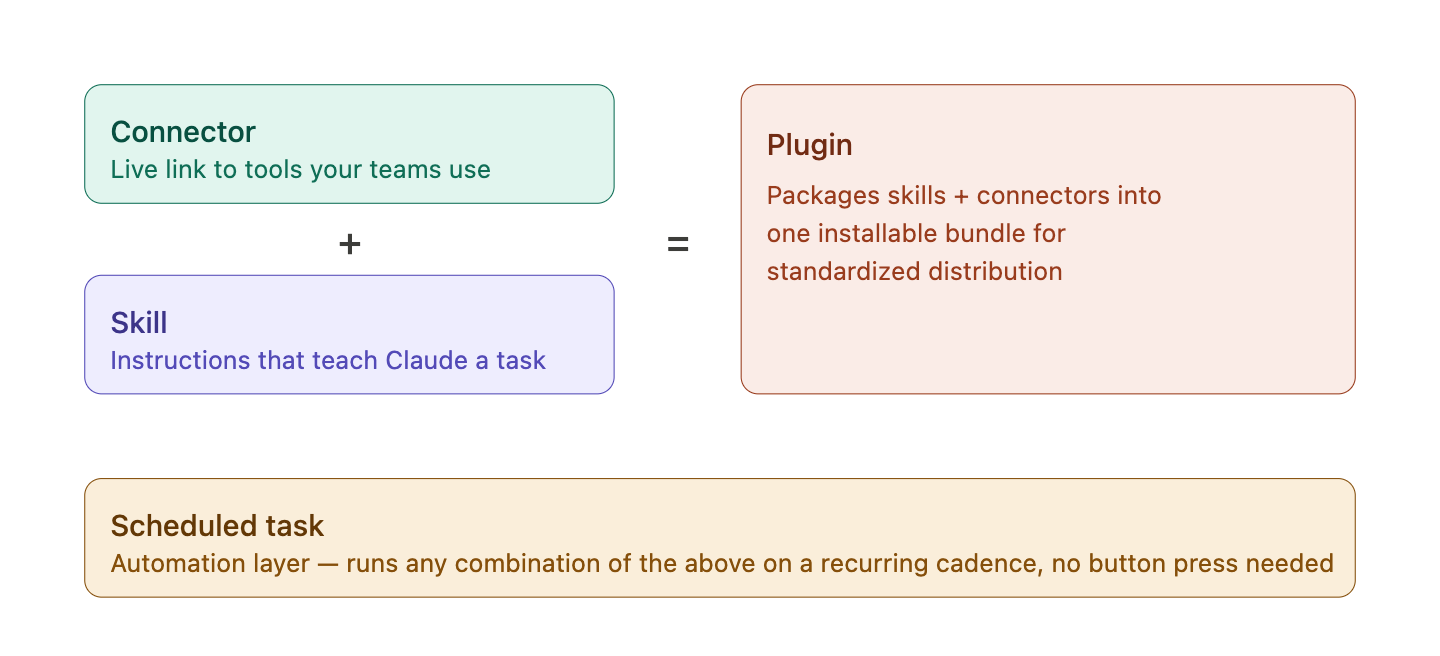
| Connectors | Make your data accessible to Claude. Give Claude access to tools your teams use — Google Drive, Slack, Salesforce(opens in new tab), GitHub, etc. | Connectors(opens in new tab) |
| Skills | Instructions that tell Claude how to do a specific task — skills work for simple tasks and multi-step workflows. | Skills(opens in new tab) |
| Plugins | Packages of skills + connectors, distributed to specific teams or your whole org. | Plugins(opens in new tab) |
| Scheduled tasks | Save a prompt and Claude runs it on a schedule (hourly, daily, weekly, weekdays, or on-demand) with access to everything a regular task does: connected tools, skills, and installed plugins, plus files on your computer while the Claude desktop app is open. Daily reports, weekly digests, recurring data pulls. | Scheduled tasks(opens in new tab) |
How the components fit together
Here's how skills, connectors and plugins combine for a single finance workflow:
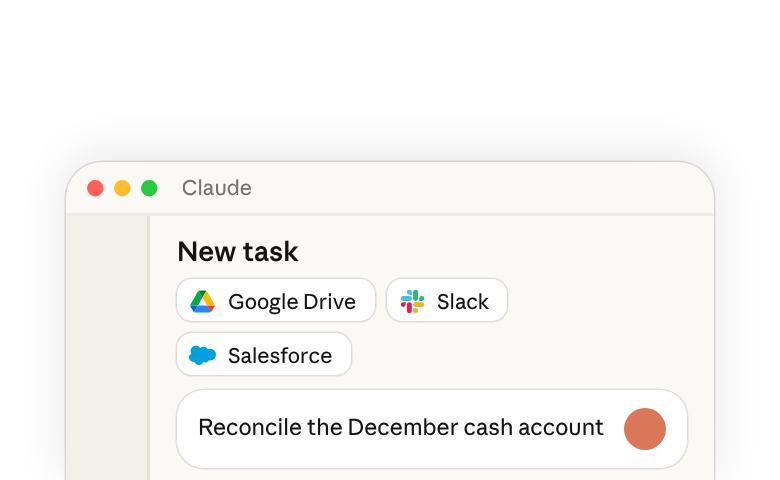
A finance team member asks Claude to reconcile the December cash account. The Finance plugin is installed, so Claude loads the reconciliation skill (step-by-step instructions for matching GL to bank). The data-warehouse connector retrieves the trial balance and transactions. Claude runs the comparison, flags discrepancies, and writes the workpaper back. One request, three pieces: connector feeds it data, skill directs Claude, plugin delivers it.
Skill flywheel: from individual to the organization
Skills, connectors and plugins scale beyond unique workflows for individuals. Taking finance as an example, here's the typical flow for individual expertise to become an organizational capability:
- Build: An FP&A manager may workshop and build a skill to pull monthly variance reports, including instructions on how to analyze revenue. The manager shares the skill with teammates.
- Vet: They give it to a few FP&A analysts to test, screen and make sure the skill is effective and safe.
- Promote: Once vetted, the finance champion promotes it to the Finance team plugin which ensures distribution to every finance teammate. Now, every FP&A analyst can run the variance skill, or schedule a prompt that runs it on a cadence.
- Spread: Throughout the department, the goal is to form a mature library of vetted skills: Accounting builds skills for completing journal entries, Treasury for completing daily cash management. They all get screened and approved by a department champion or admin.
Skills and plugins can drive horizontal workflows across your org, too. For example, an org-wide branding skill released by the design team could be provisioned by admins for every user of Claude. Now when the Finance team creates charts, they always abide by the Org's branding skill guidelines. Other workflows that cut across departments include Performance review skills that help managers draft self-reviews or compile peer feedback or a Company wiki built by connecting Claude to your knowledge base paired with skills that know how to search and synthesize it.
That's the flywheel — personal expertise becoming organizational capability, and org capabilities and best-practices getting distributed across teams.
2. Choosing a governance posture
Workflows scale when skills get distributed through departments and surface to the rest of the organization. Governance posture is your stance on how freely that movement happens.
Your governance posture determines which of these paths are open. Think through the right skill and plugin management approach for your org as you select initial settings.
| Posture | What it means | Skill and plugin policy settings (Organization settings) |
|---|---|---|
| Admin curated | Admins provision; users consume Users can't create personal skills. Peer-to-peer and peer-to-org sharing are both disabled. Skills and plugins come from admins only. | Skills: On User-created skills: Off Skill sharing: Off Publishing: Off |
| Guided creation | Users create and share skills peer-to-peer; champions promote to plugins. Users can create personal skills and share skills and their own plugins with peers. Sharing disabled peer-to-org. Champions review and promote the best skills to team plugins. | Skills: On User-created skills: On Skill sharing: On Publishing: Off |
| Fully open | Users create and share with each other and org-wide; admins monitor and curate plugins. Users can create personal skills and share skills and their own plugins with peers and the org. Admins monitor skill adoption and usage. Champions run quarterly skill reviews. | Skills: On User-created skills: On Skill sharing: On Publishing: Open |
Posture isn't one switch. It's three org-level settings in Organization settings > Plugins & skills (Policy tab), plus how you scope plugins:
- User-created skills — can users build their own?
- Skill sharing — can users hand a skill or plugin they made to a teammate?
- Publishing — can users publish to the org library: not at all ("Off"), once an owner, or anyone whose role has Libraries set to "Can manage", approves each submission ("Requires review"), or freely ("Open")?
- Plugin group access — which groups see / auto-install each plugin?
Plugin sharing to groups allows Admins to override a plugin's org-wide availability for specific groups, further scoping plugin access — e.g. make a plugin available only to the Legal group, or auto-install it for Engineering while keeping it hidden from everyone else.
Governance posture does not currently control Connector access. Connectors are org-wide on/off and, on Enterprise plans, scoped per group through custom roles. RBAC governs capability access (Cowork, Code, etc.), including who can create and share skills, within the org-level settings above.
For how admins distribute skills and plugins (admin-provisioned skills, group-scoped plugins, GitHub-synced marketplace), see Provision and manage skills for your org(opens in new tab), Manage plugins for your organization,(opens in new tab) and Customize plugin access by group(opens in new tab).
3. Champion model
Champions are enthusiastic adopters who can help drive peer adoption across their teams. They will be participants in your pilot if you run one, and play a key role in your rollout. Champions are the people who will test workflows, demo at workshops, maintain plugins, and drive adoption within their departments.
Who makes a good champion:
- A power user who is already getting value from AI tools - whether Claude or otherwise
- Willing to build and experiment for their teams
- Trusted by admins to help gather departmental feedback and surface blockers
How to find champions:
- Usage analytics are a great signal for discovering champions. Anthropic provides per-user activity data which will help uncover power users early on.
- Ask function leads to nominate
- Target ratio 1 champion per 25–50 users
- Mix technical and non-technical users across different departments
- Include enthusiasts and sceptics; an all-enthusiastic pilot gives false positives
What to give champions:
- Permission to create Skills and consider turning on peer-to-peer Skill sharing for pilot group
- A 30-minute orientation on skills, plugins, and the governance model you're using
- A channel (Slack channel, Teams group) where champions across departments can share what's working
- Access to Anthropic's pre-built plugins as starting points
- Recognition for their contributions to the rollout
What to expect from champions:
- Build 2–3 starter skills for their team
- Help their teams audit workflows and generate use case ideas
- Run a skills workshop for their team
- Own and maintain their department's plugins; identify the need for sub-team plugins (ex. Marketing vs. Demand Gen)
- Surface what's working and what's not in the champions channel
- Do a quarterly curation review of their department's skills
4. Rollout phases
The organizations that see the fastest, deepest value invest in readiness, curate first experiences, and govern deliberately by following these five principles.
- Executive sponsorship: Visible and sustained — not just a kickoff email.
- Curated first experiences: Guide users to high-value use cases, not blind experimentation.
- Connectors enabled early: The aha moment arrives faster when Claude reaches existing tools.
- Champion network first: Every team needs someone who can demo, troubleshoot, and evangelize.
- Governance defined upfront: Connector approval, skill creation, and access policies from Day 1.
Here's what a typical rollout looks like. Adapt the pace to your org. Note that the phases below assume Setup and Configuration steps from the Claude Enterprise Administrator Guide(opens in new tab) are complete.
Phase 1: Pilot
Goal: Validate your configuration and produce the first proof points with a small group of champions.
Admins and AI transformation teams own:
- Recruit 1–2 champions per pilot department. Follow criteria in Section 3.
- Enable initial connectors org-wide; sequence security review by risk tier (read-only first is common)
- Set initial governance posture for the pilot group based on strategy for skill and plugin sharing across your org
- Define 2–3 success metrics upfront and stand up feedback loops (pulse survey, dashboard review, escalation paths for feedback)
- Announce launch, initial connectors and enablement opportunities to the pilot group
Champions own:
- Install and try Anthropic's pre-built function plugins for their department
- Build 2–3 starter skills for their own work
- Report what's working / blocked in the champions channel
Exit when ready:
- >70% weekly active users by week 4
- Each pilot department has multiple repeatable use cases validated and documented
- Champions are willing and briefed to run a workshop for their teams
What changes between pilot and broad rollout is usually the governance posture, new connectors cleared by security, and new departments onboarding with their own champions.
Phase 2: Expansion
Goal: Turn pilot proof points into department-level adoption — the skill flywheel starts here.
Admins and AI transformation teams own:
- Open access to the next wave of departments; onboard their champions
- Clear the next tier of connectors through security
- Revisit governance posture with pilot evidence (most orgs loosen here)
- Stand up self-service resources and a tiered support path (champion → program team → Anthropic)
- Watch spend patterns and adjust controls
Champions own:
- Run a skills workshop for their department (format → Section 5)
- Surface team-built skills; promote the best into the department plugin
- Share wins cross-department in the champions channel
Exit when:
- Every onboarded department has a maintained plugin with a named owner
- Workshop run in each department; majority of attendees built or adopted a skill
- Connector and governance requests are flowing through a defined process
Phase 3: Scale and Monitor
Goal: Reach remaining departments and shift from launch mode to operating rhythm.
Admins and AI transformation teams own:
- Roll the workshop motion to remaining departments
- Establish cadences: monthly champion check-in, quarterly governance review
- Stand up (or formalize) an AI Enablement CoE to own the skill library and advanced capabilities
- Move measurement from activity (WAU, sessions) to outcomes (time saved, use-case ROI); report quarterly
Champions own:
- Quarterly curation: surface the best skills from their teams, promote winners to plugins, archive stale skills, merge duplicates
- Onboard replacement champions as people rotate
- Building plugins and skills enablement into new-hire onboarding
You're in steady state when:
- Every major department has an owned plugin and an active champion
- New skills are entering the library faster from champions than from the program team
- Quarterly ROI reporting is running based on business value, not just time-save
The habit worth keeping past this rollout is reassignment. Every quarter, and every time a champion moves teams, ask who owns each plugin and each scheduled task now, and move that ownership on purpose. Widen what Claude runs on its own where the output has earned it; pull a task back to a person where it hasn't. The split you drew at pilot is a starting point you'll keep redrawing as the evidence comes in.
Pitfalls to avoid:
- Launch ≠ enablement. IT flipping the switch and sending an email isn't a rollout. Treat a Claude rollout as a program requiring change management.
- First-impression failure. Unguided experimentation underwhelms — curate starter use cases per role and have champions lead first sessions.
- The chat trap. Users default to short prompts with no connectors. Enablement must demo delegation side-by-side with chat. Push users to authenticate connectors when they get provisioned.
- Treating config as permanent. Plan to revisit connectors and posture with usage evidence; a working proof point de-risks the next approval better than another security review.
Only measuring time-saved or login counts. Consider what ROI on Claude means for your business. Define outcome-based measures including net new work completed and qualitative feedback on use cases in addition to productivity measurement.
5. Enablement methods
Claude training should be hands-on-keyboard when possible — the value shows up in doing, not watching. But "training" is really three different jobs depending on where a user is in their journey. Reference Anthropics researched-backed AI Fluency principles(opens in new tab) when designing enablement for your teams.
Enablement follows a natural progression: users start by completing a single task with a connector, then build competence with skills and plugins, then reach the point where Claude runs workflows for them automatically.
Phase 1: Activation (first prompt to first skill)
Get every user from zero to their first successful task with a connector.
- Curated first session per role. Don't hand people a blank page. Share a one-pager or distribute a skill that describes "your first 3 tasks as a [sales rep / PM / analyst]."
- Connector authentication moment. Until users authenticate their connectors, Claude can't reach the tools and data their work depends on. Don't leave this to chance: a 10-min calendar hold on launch day, or have a rotation of teammates available for setup assistance.
- Side-by-side demo. The champion shows the same task done as a short prompt with no connectors vs. a delegated task with connectors. Same input, different output.
- 1:many Claude training. Introduce skills, connectors, plugins and recurring tasks following the curriculum outlined in Introduction to Claude Cowork(opens in new tab)
Phase 2: Enablement (connectors, skills, and real workflows)
Shift from first success to repeatable competence. Every user gets at least one skill they rely on and at least one plugin installed.
- Skills workshop. The centerpiece of an enablement motion. A hands-on session where every attendee builds at least one skill for their actual work. Champions run one per department during Phases 2–3. See What are Skills?(opens in new tab).
- Plugin activation push. Users who install a plugin and run its skills early learn Claude faster. Ensure relevant plugins are available coming out of the Pilot, and include directions on how to use plugins in launch comms. See Manage plugins for your organization(opens in new tab).
- Weekly office hours. 30-min drop-in where the champion screen-shares, unblocks stuck users, and demos new skills.
- Skill of the week. Team posts one skill in the team channel with a short video of it running on real work. Skills provide inspiration for cross-functional teams.
- Champion demo days. Cross-department show-and-tell on a monthly cadence. A sales champion demos their call-prep skill; an engineer demos their incident postmortem drafter. This is how ideas cross silos.
Phase 3: Habit (automation and steady state)
Lasting adoption means Claude is already running when users sit down in the morning.
-
Get everyone one scheduled task. Once a user has a daily pipeline digest or weekly report landing automatically, Claude comes to them. Run this one yourself before you ask champions to teach it. Ask Claude:
Set up a scheduled task for every weekday at 8am: pull our open pipeline from the connected CRM, summarize the deals that changed stage yesterday, and post the digest to our team channel.
A scheduled task runs with the same access as any other task, so whatever it produces lands in your real tools. Before rolling the habit out, check the result the way you'd check a new hire's first report: open the channel after the first run and confirm the digest is there, covers yesterday's changes, and reads the way your team expects. A task that runs on time but posts the wrong summary is one your team will quietly stop trusting. See Scheduled tasks(opens in new tab).
-
Embed in existing rituals. The standard for a weekly pipeline review becomes the Claude-generated digest. The standard for a monthly board deck becomes a Claude-assembled first draft. Attach Claude to existing working rhythms.
Bake into new-hire onboarding. Include Claude in Day-1 checklist: install the desktop app (if their work needs files and applications on their computer, or if your organization requires it), authenticate 3 connectors, install the department plugin, run its flagship skill. See Installing Claude Desktop(opens in new tab).
6. FAQ
Can I control which connectors specific users see? Yes, on Enterprise plans. Users on a custom role see only the connectors their roles include; users on a built-in role see every connector enabled org-wide.
If I enable a connector, does Claude automatically access everyone's data? No. Connectors use a three-gate model: an admin enables the connector org-wide, the user's role includes it, and each user links their own account, unless you set up managed authorization through your identity provider. Claude can only access data within that user's existing permissions.
Can users share skills that include API keys or credentials? Skills should never contain credentials. If a skill needs authenticated access, it should use a connector. Include this in your champion training and skill-vetting process. We recommend creating a skill-audit skill that runs standard checks before approving skills for org-wide distribution or inclusion in plugins.
How do I prevent people from creating duplicate or low-quality skills? Namespace by department, run quarterly curation reviews, and use the champion model. The guided-creation posture is the best balance for most teams — people can create freely, but promotion to org level goes through a review.
How do plugins sync with version control? Plugins support GitHub sync. Connect a private GitHub repo as a plugin marketplace. Changes merge through your normal PR process and auto-sync to users. See Manage plugins for your organization(opens in new tab) for repo structure details.
What's the difference between a skill and a scheduled task? A skill runs when someone triggers it. A scheduled task is a saved prompt that Claude runs automatically on a schedule, with the same access as any other task. Users set one up by giving a prompt and picking a schedule under Scheduled in the sidebar, or by asking Claude. A natural-language request like "every day at 6am" is enough to create one, and most scheduled tasks get created that way. Common use: a daily pipeline digest that runs every morning at 8am and posts to Slack.
Where do I go for help with desktop app installation or connector setup? See the Claude Enterprise Administrator Guide(opens in new tab), which links to the desktop app deployment and connector setup articles.
Further reading: Claude Cowork Enterprise Admin Guide(opens in new tab) ·Provision and manage Skills for your organization(opens in new tab) · Manage plugins for your organization(opens in new tab) · Schedule recurring tasks in Claude Cowork(opens in new tab) · Deploying Claude Enterprise with confidence(opens in new tab)